Overview
Now it's time to take care of the resolver for our Subscription field. This resolver has a special job, along with a special shape. It's a resolver unlike any other! Once we've taken care of the subscription resolver, we need to make sure our mutation is passing along the right data.
🎯 Goal 1: Implement the resolver function for Subscription.listenForMessageInConversation
🎯 Goal 2: Update the resolver function for Mutation.sendMessage to send the message as the event payload
When your subscription is successfully running, here's what you can expect to see.
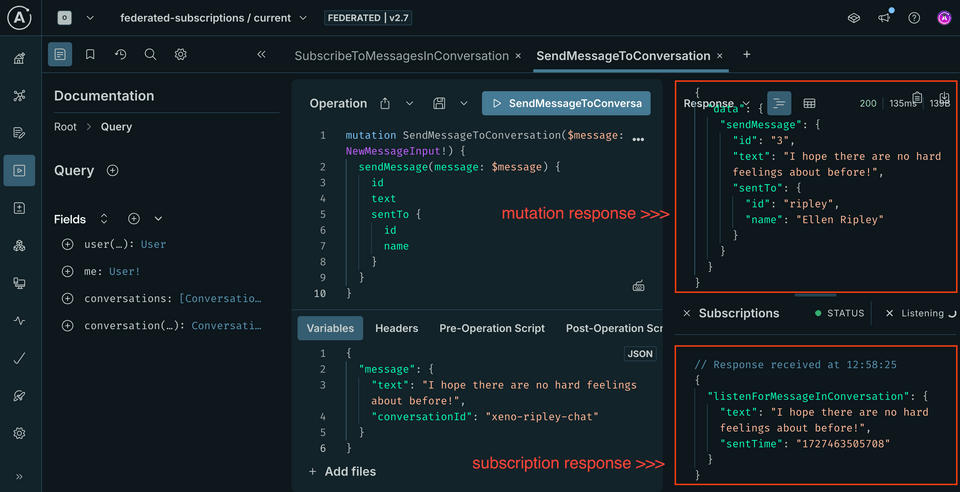
The Subscription resolver
- Start by creating the
Subscription.tsfile in theresolversfolder. Here's some boilerplate you can use.
import { Resolvers } from "../__generated__/resolvers-types";export const Subscription: Resolvers = {Subscription: {listenForMessageInConversation: {// TODO},},};
- Right away, we can jump into
resolvers/index.tsand uncomment theSubscriptionresolver import so that it's included in our resolvers map.
import { Query } from "./Query";import { Mutation } from "./Mutation";import { Message } from "./Message";import { Conversation } from "./Conversation";import { User } from "./User";import { Subscription } from "./Subscription";const resolvers = {...Query,...Mutation,...Conversation,...Message,...User,...Subscription,};export default resolvers;
- Back in
resolvers/Subscription.ts, give thelistenForMessageInConversationobject asubscribefunction.
listenForMessageInConversation: {subscribe: () => {}},
- Destructure the third positional argument,
contextValue, for itspubsubproperty.
listenForMessageInConversation: {subscribe: (_, __, { pubsub }) => {}},
- Return the results of calling
pubsub.asyncIterator, passing in an array with the event string we're listening for:"NEW_MESSAGE_SENT".
listenForMessageInConversation: {subscribe: (_, __, { pubsub }) => {return pubsub.asyncIterator(["NEW_MESSAGE_SENT"])}},
At this point, you'll probably see an error from TypeScript about the type that the subscribe function returns. This is a known bug. Currently, there are two workarounds. You can either apply // @ts-ignore to the line just above the error, or you can modify the object returned as shown below under Option 2. Please pick whichever option you like best!
listenForMessageInConversation: {// @ts-ignoresubscribe: (_, __, { pubsub }) => {return pubsub.asyncIterator(["NEW_MESSAGE_SENT"])}},
listenForMessageInConversation: {subscribe: (_, __, {pubsub}) => {return {[Symbol.asyncIterator]: () => pubsub.asyncIterator(["NEW_MESSAGE_SENT"])}}},
Want to learn more about the AsyncIterator interface? Check out the MDN Web Docs.
Update the Mutation resolver
The resolver function for Mutation.sendMessage is publishing the right event, but it's not passing anything along with it. In order for our subscribe function to receive the new data, our mutation needs to pass it along as its payload.
Jump to resolvers/Mutation.ts.
- Scroll down to where we call
pubsub.publishin theMutation.sendMessageresolver. Currently, we pass a second argument to this call, an object.
await pubsub.publish("NEW_MESSAGE_SENT", {});
- Give the object a key that matches the name of our
Subscriptionfield.
await pubsub.publish("NEW_MESSAGE_SENT", {listenForMessageInConversation: // TODO});
- As the value, pass in an object containing only the attributes of the message that are present on the
Messagetype. Hint: Check out the attributes returned by the call to the database. Which ones should we pass along? Do all the names match the fields onMessage?
await pubsub.publish("NEW_MESSAGE_SENT", {listenForMessageInConversation: {id,text: messageText,sentFrom,sentTo,sentTime,},});
Try it out!
Return to Studio Explorer. Let's build some operations!
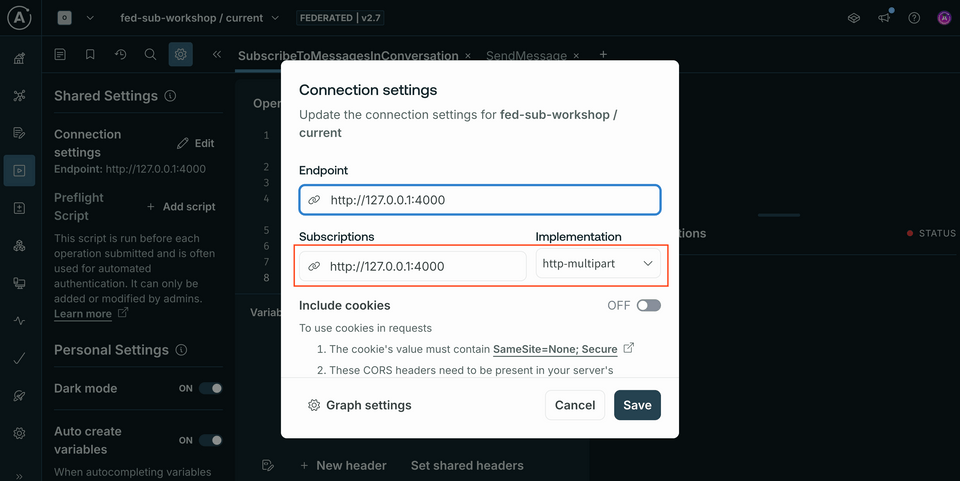
Running a subscription
We'll start by subscribing to a particular conversation. Open up the SubscribeToMessagesInConversation operation from your Operation Collection; alternatively, copy it below.
subscription SubscribeToMessagesInConversation($listenForMessageInConversationId: ID!) {listenForMessageInConversation(id: $listenForMessageInConversationId) {textsentTime}}
And in the Variables panel:
{"listenForMessageInConversationId": "xeno-ripley-chat"}
This should kick off the subscription in the right-hand Response panel (a little window labeled Subscriptions should appear near the bottom).
Next, open up a new tab. Here, we'll trigger a mutation to send a message to that conversation (SendMessageToConversation from your Operation Collection).
mutation SendMessageToConversation($message: NewMessageInput!) {sendMessage(message: $message) {idtextsentTo {idname}}}
And in the Variables panel:
{"message": {"text": "I hope there are no hard feelings about before!","conversationId": "xeno-ripley-chat"}}
Note: To participate in conversation "xeno-ripley-chat", you should be authenticated as either user "xeno" or "ripley". (This means that your Authorization header should have the value Bearer xeno or Bearer ripley.)
Try updating your Authorization header - and sending a response from the other participant in the conversation!
Share your questions and comments about this lesson
Your feedback helps us improve! If you're stuck or confused, let us know and we'll help you out. All comments are public and must follow the Apollo Code of Conduct. Note that comments that have been resolved or addressed may be removed.
You'll need a GitHub account to post below. Don't have one? Post in our Odyssey forum instead.