Overview
Time to bring live data into our UI.
In this lesson, we will:
- Update our Jetpack Compose code to render launch data from the query we wrote
- Display a list of launches in a LazyColumn
Set up the LaunchList composable
In this section, we'll be looking at LaunchList.kt. In that module, we will declare a list of LaunchListQuery.Launch types, initialized as empty:
@Composablefun LaunchList(onLaunchClick: (launchId: String) -> Unit) {var launchList by remember { mutableStateOf(emptyList<LaunchListQuery.Launch>()) }LaunchedEffect(Unit) {// ...
LaunchListQuery.Launch is a typesafe generated model from your LaunchList.graphql query.
Make a UI for the launch items
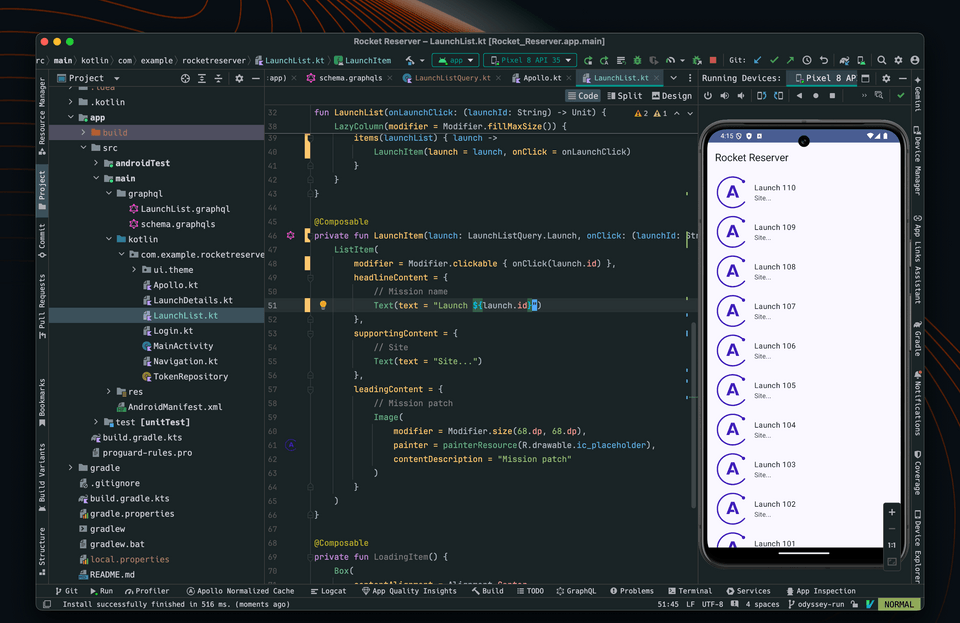
Further down in the file, find the LaunchItem composable. We will pass it a LaunchListQuery.Launch and display the id:
@Composableprivate fun LaunchItem(launch: LaunchListQuery.Launch, onClick: (launchId: String) -> Unit) {ListItem(modifier = Modifier.clickable { onClick(launch.id) },headlineContent = {// Mission nameText(text = "Launch ${launch.id}")},
Use the data in the list
Fill launchList with the data from the response, and use it in the LazyColumn:
@Composablefun LaunchList(onLaunchClick: (launchId: String) -> Unit) {var launchList by remember { mutableStateOf(emptyList<LaunchListQuery.Launch>()) }LaunchedEffect(Unit) {val response = apolloClient.query(LaunchListQuery()).execute()launchList = response.data?.launches?.launches?.filterNotNull() ?: emptyList()}LazyColumn {items(launchList) { launch ->LaunchItem(launch = launch, onClick = onLaunchClick)}}}
You can remove the Log.d invocation as part of this step. You will also need to import some extension functions.
About nullability
You may have noticed that we are using .filterNotNull() in the above code snippet. That is necessary because the schema for our GraphQL service defines launches as a list of nullable Launch objects:
type LaunchConnection {launches: [Launch]!}
In GraphQL, all fields are nullable by default. Fields annotated with ! are non-null. This syntax can be a little confusing with lists, especially since there's an exclamation ! in the expression. Here's a little guide:
launches: [Launch] # `launches` can be null, and each list element can be nulllaunches: [Launch!]! # `launches` cannot be null, and each list element cannot be nulllaunches: [Launch!] # `launches` can be null, but if it's not, each list element cannot be nulllaunches: [Launch]! # `launches` cannot be null, but each list element can be null
So in our app, the schema tells us that launches will always be a list, and each element within that list will be a Launch object or null. Apollo Kotlin translates that logic from GraphQL to Kotlin via code generation. We don't want to show null to our users, though, which is why we filter those items out of our array.
Test your query
Hit the Run button. You now have a UI connected to your GraphQL queries 🚀
Practice
!) next to a field in a GraphQL schema signify?Up next
Showing our basic launch details is only the beginning. Next up, let's supplement our query with a few more fields.
Share your questions and comments about this lesson
This course is currently in
You'll need a GitHub account to post below. Don't have one? Post in our Odyssey forum instead.