Overview
Pagination is one area where GraphQL shines—but it can be a bit tricky at first. Let's take a closer look! 👀
In this lesson, we will:
- Use the
cursorvariable to load new sets of data - Implement the app logic to programmatically load more data
Paginating the list of launches
Let's jump into the RocketReserverAPI local package, drilling down until we find the LaunchListQuery.graphql file in the Queries directory. We can see that the object returned from the LaunchListQuery is a LaunchConnection.
public static var __parentType: any ApolloAPI.ParentType {RocketReserverAPI.Objects.LaunchConnection}public static var __selections: [ApolloAPI.Selection] { [.field("__typename", String.self),.field("cursor", String.self),.field("hasMore", Bool.self),.field("launches", [Launch?].self),]}
This object has a list of launches, a pagination cursor, and a boolean to indicate whether more launches exist.
When using a cursor-based pagination system, it's important to remember that the cursor gives us a place where we can get all results after a certain spot, regardless of whether more items have been added in the interim.
In an earlier lesson, we hardcoded the SMALL size argument directly in the GraphQL query, but we can also define arguments programmatically using variables. We'll use them here to implement pagination.
Add a cursor variable
Returning to the graphql directory in our project, open up LaunchList.graphql. Here, we'll add a cursor variable. (Remember that in GraphQL, variables are prefixed with the dollar sign.)
query LaunchList($cursor: String) {launches(after: $cursor) {hasMorecursorlaunches {idsitemission {namemissionPatch(size: SMALL)}}}}
Now re-run code generation to update the GraphQL code.
./apollo-ios-cli generate
We can return to the Variables panel in Explorer to test this out. If we omit the $cursor variable, the server returns data starting from the beginning. Try it out:
Now let's make sure our app's views are making use of this cursor.
Update LaunchListViewModel to use cursor
First, we need to hang onto the most recently received LaunchConnection object.
Add a variable to hold on to this object, as well as a variable for the most recent request, at the top of the LaunchListViewModel.swift file near the launches variable:
@Published var launches = [LaunchListQuery.Data.Launches.Launch]()+ @Published var lastConnection: LaunchListQuery.Data.Launches?+ @Published var activeRequest: Cancellable?@Published var appAlert: AppAlert?@Published var notificationMessage: String?
Next, let's update our loadMoreLaunches() method to use the cursor property as well as manage the lastConnection and activeRequest properties:
private func loadMoreLaunches(from cursor: String?) {self.activeRequest = Network.shared.apollo.fetch(query: LaunchListQuery(cursor: cursor ?? .null)) { [weak self] result inguard let self = self else {return}self.activeRequest = nilswitch result {case .success(let graphQLResult):if let launchConnection = graphQLResult.data?.launches {self.lastConnection = launchConnectionself.launches.append(contentsOf: launchConnection.launches.compactMap({ $0 }))}if let errors = graphQLResult.errors {self.appAlert = .errors(errors: errors)}case .failure(let error):self.appAlert = .errors(errors: [error])}}}
Now implement the loadMoreLaunchesIfTheyExist() method to check if there are any launches to load before attempting to load them. Replace the TODO with the following code:
func loadMoreLaunchesIfTheyExist() {guard let connection = self.lastConnection else {self.loadMoreLaunches(from: nil)return}guard connection.hasMore else {return}self.loadMoreLaunches(from: connection.cursor)}
Update UI Code
Next, we'll go to LaunchListView and update our task to call the newly implemented loadMoreLaunchesIfTheyExist() method:
.task {viewModel.loadMoreLaunchesIfTheyExist()}
Now update the List to optionally add a button to load more launches at the end of the list:
List {ForEach(0..<viewModel.launches.count, id: \.self) { index inNavigationLink(destination: DetailView(launchID:viewModel.launches[index].id)) { LaunchRow(launch:viewModel.launches[index])}}if viewModel.lastConnection?.hasMore != false {if viewModel.activeRequest == nil {Button(action: viewModel.loadMoreLaunchesIfTheyExist) {Text("Tap to load more")}} else {Text("Loading...")}}}
Test pagination
Build and run the app. Now when we scroll to the bottom of the list, we should see a row that says Tap to load more.
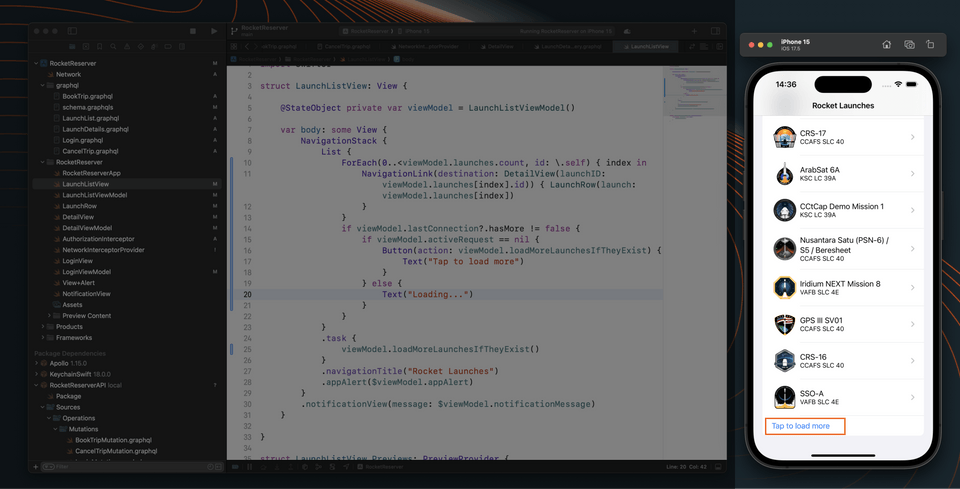
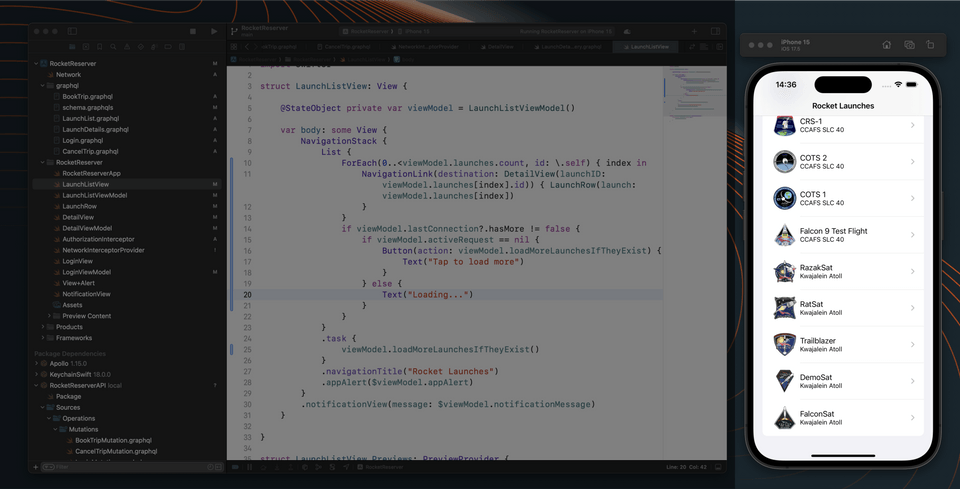
When we tap that row, the next set of launches will be fetched and loaded into the list. If we continue this process eventually the Tap to load more button will no longer be displayed because all launches have been loaded.
Up next
Let's wrap up this course by implementing a notification feature when we book a seat on a launch. Full steam ahead to subscriptions!
Share your questions and comments about this lesson
This course is currently in
You'll need a GitHub account to post below. Don't have one? Post in our Odyssey forum instead.