Overview
We're just a couple steps away from booking and cancelling trips—all that's missing are a few new mutations!
In this lesson, we will:
- Implement the
BookTripandCancelTripmutations - Complete the views to enable these features in our app
Add the BookTrip mutation
Back in Sandbox, let's take a closer look at the following bookTrips mutation:
mutation BookTripsMutation($bookTripsLaunchIds: [ID]!) {bookTrips(launchIds: $bookTripsLaunchIds) {}}
In the left sidebar (Documentation), click Root -> Mutation -> bookTrips. You can see that this field declares a variable $bookTripsLaunchIds which is a list of IDs. The output object defines three fields:
- A
successboolean indicating whether the booking succeeded - A
messagestring to display to the user - A list of
launchesthe current user has booked
Click the plus signs next to success and message to add those to the operation.
In the Variables section of Apollo Sandbox, add an array of identifiers. In this case, we'll use a single identifier to book one trip:
{"bookTripsLaunchIds": ["25"]}
Next, directly next to the word Variables, you'll see the word Headers. Click that to bring up the Headers section. Click the New Header button, and add Authorization in the header key text box.
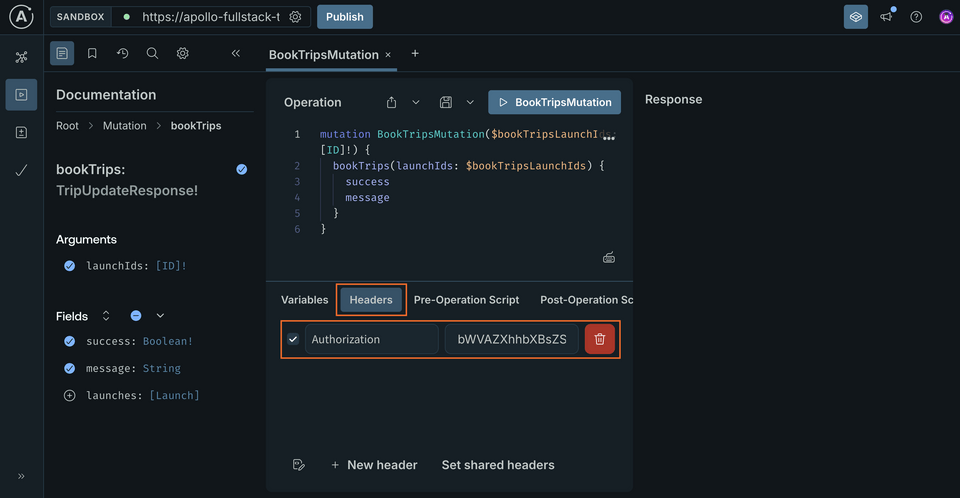
For the value, we'll paste the token we got back in the last section:
bWVAZXhhbXBsZS5jb20=
Now, let's fire off the operation. We'll get back information regarding the trips (or in this case, trip) we've just booked.
Note: If you receive an error that says "Cannot read property 'id' of null", that means your user was not found based on the token you passed through. Make sure your authorization header is properly formatted and that you're actually logged in!
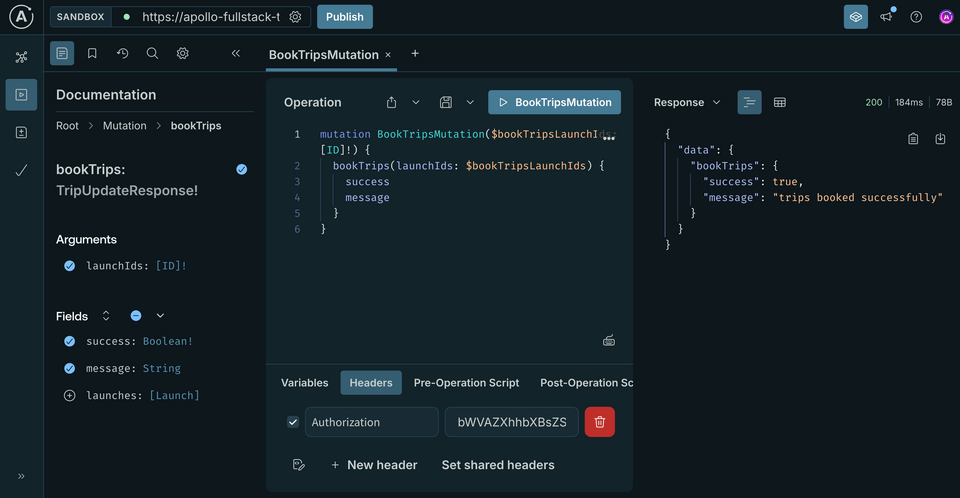
With a mutation written like this, we can book any number of trips we want at the same time. However, the booking mechanism in our application will only let us book one trip at a time.
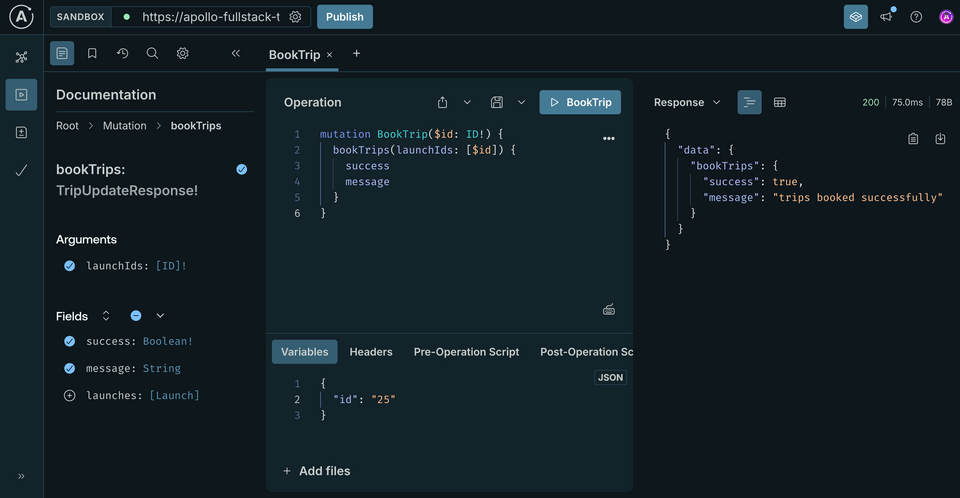
Luckily, there's an easy way to update the mutation so it's required to only accept a single object. First, update the name of your operation in Explorer to the singular BookTrip. Next, update the mutation to take a single $id, then pass an array containing that $id to the bookTrips mutation:
mutation BookTrip($id: ID!) {bookTrips(launchIds: [$id]) {successmessage}}
This is helpful because the Kotlin code generation will now generate a method that only accepts a single ID instead of an array, but you'll still be calling the same mutation under the hood, without the backend needing to change anything.
In the Variables section of Apollo Sandbox, update the JSON dictionary to use id as the key, and remove the array brackets from around the identifier:
{"id": "25"}
Run the updated query. The response we get back should be identical to the one we got earlier:
Next to schema.graphqls add a BookTrip.graphql file and paste in the final query from the Apollo Sandbox:
mutation BookTrip($id: ID!) {bookTrips(launchIds: [$id]) {successmessage}}
Don't forget to build your app so code generation creates the necessary BookTripMutation Kotlin class.
Implement booking a trip in the app
Go back to LaunchDetails.kt, and replace the TODOs in onBookButtonClick by executing the appropriate mutation based on whether the launch is booked:
private suspend fun onBookButtonClick(launchId: String, isBooked: Boolean, navigateToLogin: () -> Unit): Boolean {if (TokenRepository.getToken() == null) {navigateToLogin()return false}val response = apolloClient.mutation(BookTripMutation(id = launchId)).execute()return when {response.exception != null -> {Log.w("LaunchDetails", "Failed to book/cancel trip", response.exception)false}response.hasErrors() -> {Log.w("LaunchDetails", "Failed to book/cancel trip: ${response.errors?.get(0)?.message}")false}else -> true}}
Now back in the LaunchDetails private function, declare a coroutine scope to be able to call the suspend onBookButtonClick. Also, let's remember isBooked and change the button's text accordingly:
// Book buttonval scope = rememberCoroutineScope()var isBooked by remember { mutableStateOf(data.launch?.isBooked == true) }Button(modifier = Modifier.padding(top = 32.dp).fillMaxWidth(),onClick = {scope.launch {val ok = onBookButtonClick(launchId = data.launch?.id ?: "",isBooked = isBooked,navigateToLogin = navigateToLogin)if (ok) {isBooked = !isBooked}}}) {Text(text = if (!isBooked) "Book now" else "Cancel booking")}
Let's also add a loading indicator and prevent the button from being clicked while the mutation is running:
// Book buttonvar loading by remember { mutableStateOf(false) }val scope = rememberCoroutineScope()var isBooked by remember { mutableStateOf(data.launch?.isBooked == true) }Button(modifier = Modifier.padding(top = 32.dp).fillMaxWidth(),enabled = !loading,onClick = {loading = truescope.launch {val ok = onBookButtonClick(launchId = data.launch?.id ?: "",isBooked = isBooked,navigateToLogin = navigateToLogin)if (ok) {isBooked = !isBooked}loading = false}}) {if (loading) {SmallLoading()} else {Text(text = if (!isBooked) "Book now" else "Cancel booking")}}
Before we run it, let's add the code to cancel a trip as well.
Add the CancelTrip mutation
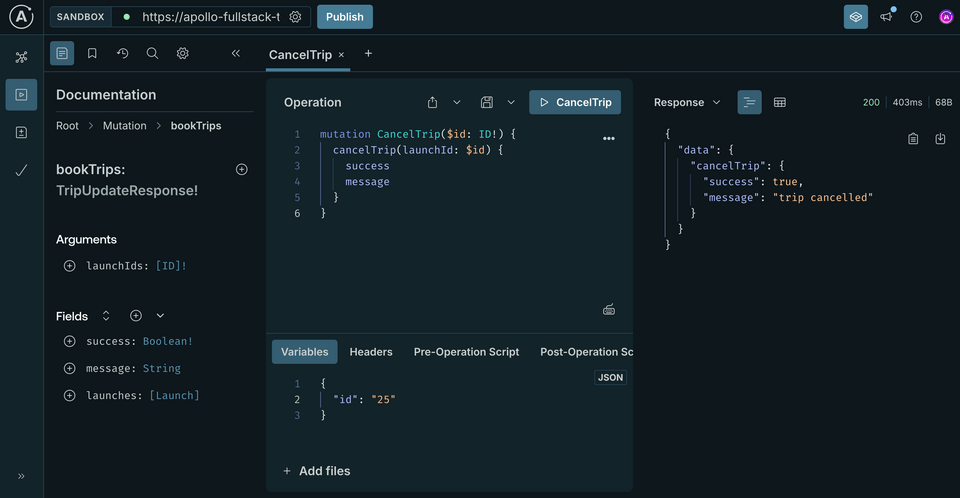
The process for the CancelTrip mutation is similar to the one for BookTrip. Here's how it looks in Apollo Sandbox:
mutation CancelTrip($id: ID!) {cancelTrip(launchId: $id) {successmessage}}
One key difference from bookTrips is that we're only allowed to cancel one trip at a time because only one ID! is accepted as a parameter.
In the Variables section of Apollo Sandbox, we can use the exact same JSON that we used for BookTrip (because it also used a single identifier called "id"):
{"id": "25"}
Important: Make sure that in the Headers section, you add your authorization token again (the token added to the tab with BookTrip won't carry over to this new tab).
Run the operation to cancel the trip, and we should see a successful response!
Implement the cancelTrip logic
Once again, go back to Android Studio and create a new GraphQL file named CancelTrip.graphql. Then, paste in the final query from Apollo Sandbox:
mutation CancelTrip($id: ID!) {cancelTrip(launchId: $id) {successmessage}}
Don't forget to build your app so codegen runs.
Now we'll make a slight adjustment to our onBookButtonClick function from earlier:
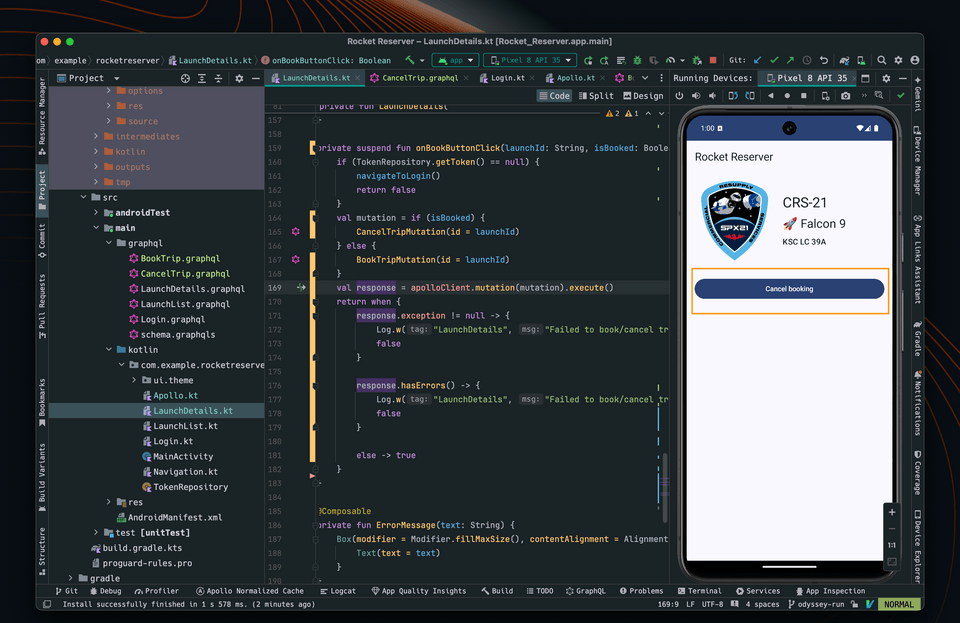
private suspend fun onBookButtonClick(launchId: String, isBooked: Boolean, navigateToLogin: () -> Unit): Boolean {if (TokenRepository.getToken() == null) {navigateToLogin()return false}val mutation = if (isBooked) {CancelTripMutation(id = launchId)} else {BookTripMutation(id = launchId)}val response = apolloClient.mutation(mutation).execute()
Testing our changes
Compile and run your app. You can now book and cancel your trips! The button will change based on whether a trip has been booked or not.
Up next
Coming up next, let's explore how we can show different subsets of our data using pagination.
Share your questions and comments about this lesson
This course is currently in
You'll need a GitHub account to post below. Don't have one? Post in our Odyssey forum instead.