What is MCP?
The Model Context Protocol (MCP) is a standard way for language models and AI agents to interact with external data sources and backend systems.
Why MCP?
Simply put, MCP brings a set of standards for the tools we provide to agents. Before MCP, teams using GraphQL would build tools that call GraphQL operations by a hashed id. This practice works great, but MCP adds a set of lifecycle events around those tools like a "tool list changed" notification from the server to the agent.
What do I use MCP for?
- External use: Enable your customers to interact with your business through an agent
- Internal use: Understand your org's APIs so you can:
- Explore the data and capabilities available
- Build new features faster
- Write GraphQL operations easily
Understanding the architecture
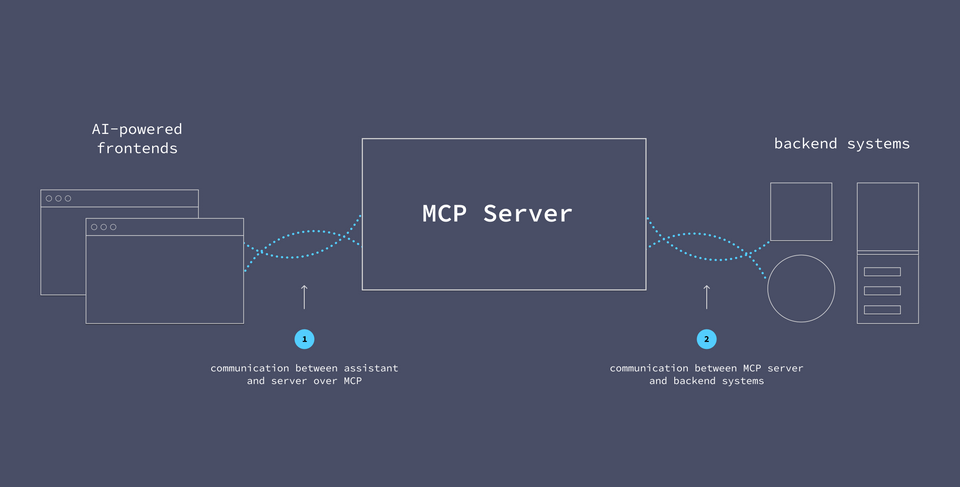
The MCP server is a server that sits between the AI agent and the backend systems.
To help the MCP server do its job, we equip it with MCP tools.
MCP Tools
An MCP tool is a function that the MCP server can invoke.
Basic tools will specify at least a name, description, and inputSchema. The inputSchema defines the JSON schema for any required inputs the assistant needs to provide when calling the tool.
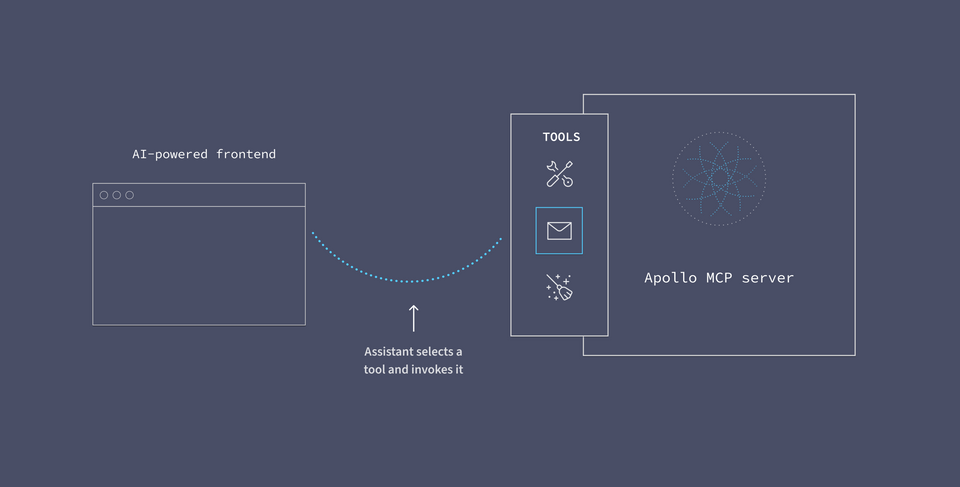
A tool's name and description helps the AI agent understand its purpose. When powered by an LLM like Claude, the agent can use its broad understanding of language and semantics to determine which tool is most appropriate when responding to a user's question.
Using tool descriptions, the AI agent can determine which tool to invoke based on the user's request.
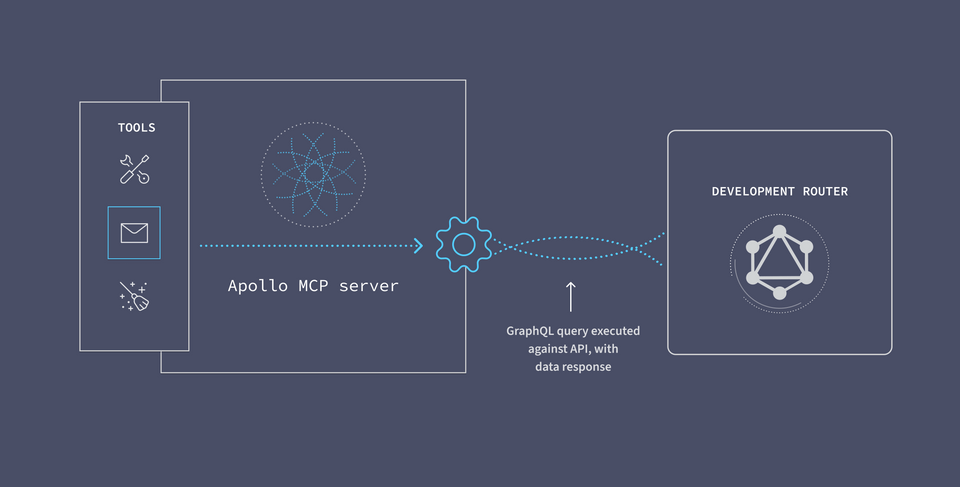
After the user grants permission for the MCP server to invoke a tool, the MCP server will execute the tool request.
A note on tool annotation
Tool descriptions help AI agents understand what the tool does and how to best use it. GraphQL's declarative nature and typed schema makes this easy. You can also:
- Provide verbose and clear GraphQL operation names (e.g.
GetFiveRecentIssuesvsGetIssues)) - Add a comment above the operation (prefixed by
#) that says exactly what the tool does and if it requires any parameters. This will override the auto-generated description from your schema. - Add comments about parameters above each value to describe valid values to pass.
- Where needed alias field names to a more verbose value. For example
userIdis more descriptive thanidwhen providing context about your tool.
For more information on writing tool descriptions, check out the following resources:
The Apollo MCP Server
In the case of the Apollo MCP Server, the tool comes in the form of a GraphQL operation. The server uses the self-documenting GraphQL schema to tell the agent everything it needs to know about each tool's purpose.
With GraphQL, we can write specific queries that request data from multiple backend services all at once. GraphQL does the heavy-lifting of API orchestration for us.
It also helps ensure that authentication policies are enforced, that APIs are called in the right sequence, and that only the appropriate data is used and returned.
To use the Apollo MCP server, you need a GraphQL API, a graph, that brings all your services behind one endpoint for the MCP server to call.
Server to API communication
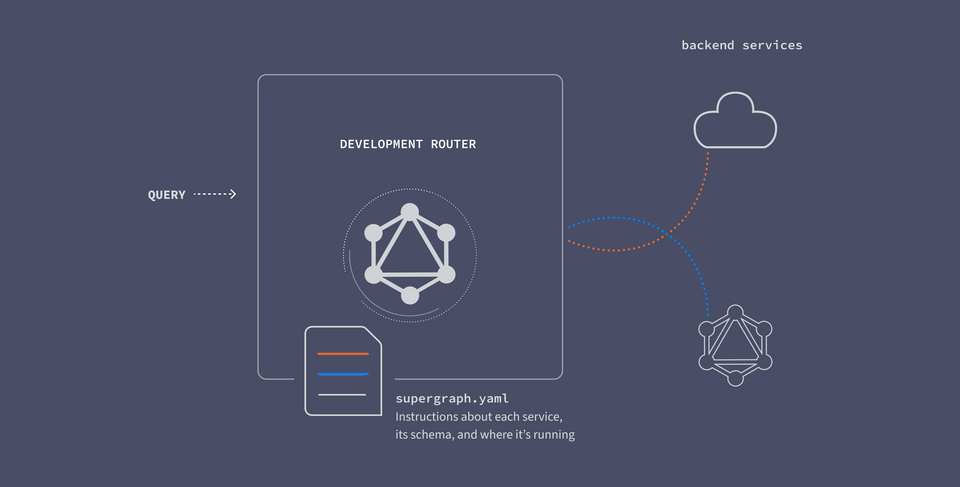
On the other side of the equation, we need our MCP server to be able to communicate with our backend services. We can execute queries against the API by sending them to the local router.
The router works by receiving GraphQL queries, breaking them up across the responsible backend services, and returning the response.
In the case of the Apollo MCP Server, the tool comes in the form of a GraphQL operation.