Overview
Our schema can ask for a single track by ID. Next we'll wire that field to the REST API through a data source method and a resolver that reads GraphQL arguments.
In this lesson, we will:
- Explore the REST API endpoint for a single track
- Add a
getTrackmethod to ourTrackAPIdata source - Implement a
Query.trackresolver using theargsparameter
📥 Retrieving our data
Our schema is freshly updated with new types and a new query for fetching a given track. We'll need to implement resolvers and data source methods for these new fields.
Our REST API can be found here: https://catstronauts-api.up.railway.app.
It has a GET track/:id endpoint, which takes the track ID as a parameter and returns that track's data. Let's first try out this endpoint: give it a track ID c_0 and check if it provides us with all the necessary data.
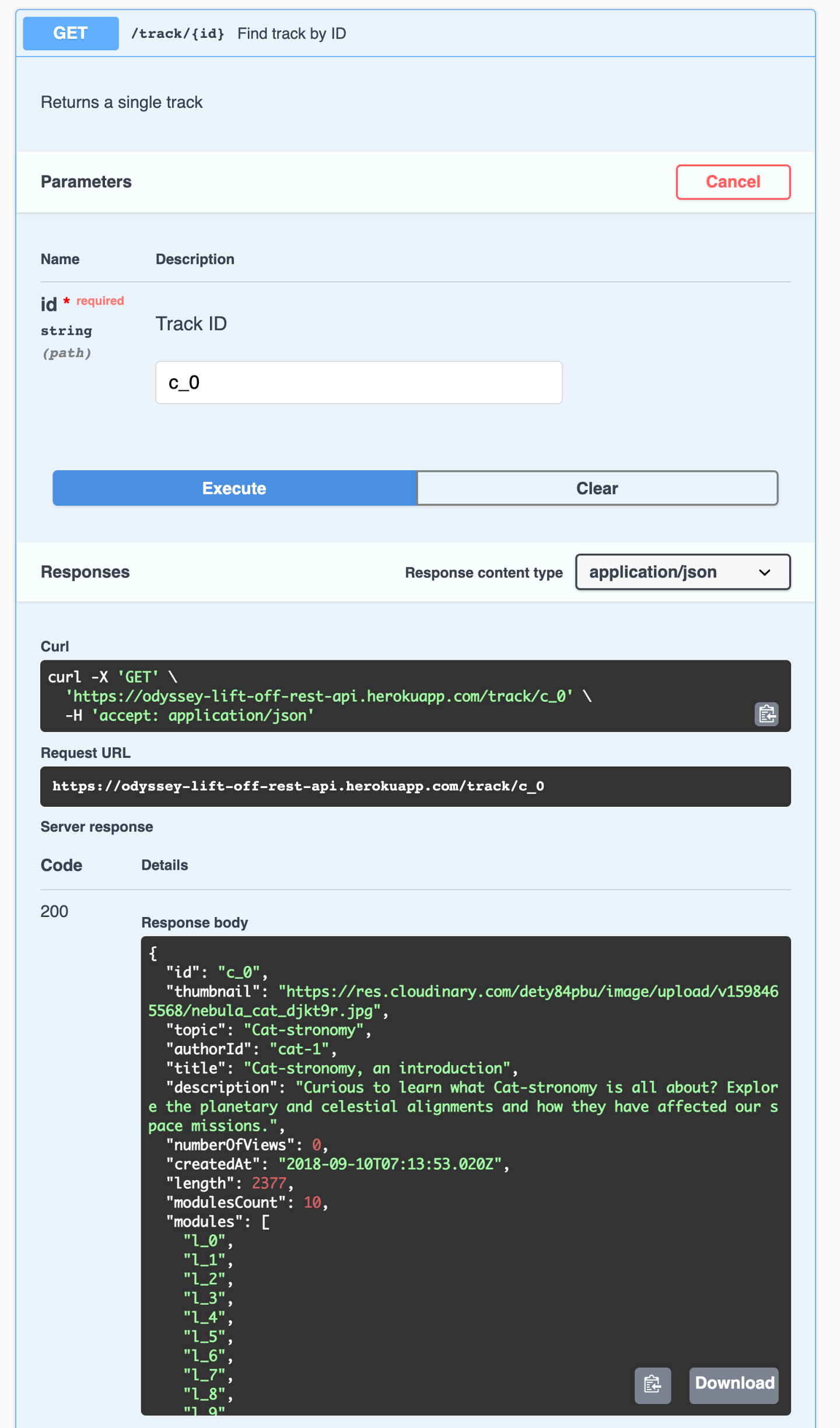
Here's the full GET /track/c_0 response:
{"id": "c_0","thumbnail": "https://res.cloudinary.com/apollographql/image/upload/v1730818804/odyssey/lift-off-api/nebula_cat_djkt9r_nzifdj.jpg","topic": "Cat-stronomy","authorId": "cat-1","title": "Cat-stronomy, an introduction","description": "Curious to learn what Cat-stronomy is all about? Explore the planetary and celestial alignments and how they have affected our space missions.","numberOfViews": 0,"createdAt": "2018-09-10T07:13:53.020Z","length": 2377,"modulesCount": 10,"modules": ["l_0","l_1","l_2","l_3","l_4","l_5","l_6","l_7","l_8","l_9"]}
Looking closely at the shape of that response, we can see that we do get the description and the numberOfViews. That's great! We also get an array of modules, but they're only IDs, and we'll need more details than that. We'll have to use another endpoint to get those details later.
💾 Updating the RESTDataSource
Let's take care of our TrackAPI, the data source in charge of calling our REST API and retrieving the data. We can find it in the server/src/datasources folder, in the track-api.js file.
Let's create a new method to get a single track based on its ID. Let's call it getTrack, and it'll take a trackId as a parameter.
We'll use the get method provided by our RESTDataSource class to make a call to the track/:id endpoint, passing it the trackId from the arguments. Then, we'll return the results.
In track-api.js, add the following method to the TrackAPI class:
getTrack(trackId) {return this.get(`track/${trackId}`);}
Now that our data source is retrieving the data, our resolver should be able to use it! In Lift-off II, we already worked out the connection between our resolvers and data sources inside the ApolloServer configuration options, so we should be good to add more resolvers as necessary.
✍️ Adding a new resolver
Let's take care of this track resolver. In the server/src folder, open up the resolvers.js file.
In our Query object, we'll add a new function below tracksForHome. In our schema, we named the fieldtrack, so here it has to have the same name.
Recall that a resolver is a function with four optional parameters: parent, args, contextValue, and info.
In resolvers.js, add the following after the tracksForHome resolver:
track: (parent, args, contextValue, info) => {},
We've used the third argument contextValue before, to access the dataSources key. This is where our trackAPI.getTrack method lives. This method expects the id of a track. We'll specify that value later as an argument when we build the query.
To access this id, we can use the second parameter in the resolver: args. args is an object that contains all GraphQL arguments that were provided for the field. We can destructure this object to access the id property, then pass that id into our getTrack method.
Then, we can return the results of that method.
Update the track resolver in resolvers.js:
track: (parent, {id}, {dataSources}, info) => {return dataSources.trackAPI.getTrack(id);},
Finally, let's clean up our two other parameters. We can replace parent with an underscore since we won't be using it, and we can omit the last parameter info altogether; we won't use it either.
Let's not forget to add a nice little comment above to help teammates and future you make sense of what this resolver does.
Update the track resolver in resolvers.js:
// get a single track by ID, for the track pagetrack: (_, {id}, {dataSources}) => {return dataSources.trackAPI.getTrack(id);},
Code review
Practice
c_1. What's the first module ID on the list?Write a resolver function for the spaceCat field to query a spaceCat by ID. Follow the conventions used above for the four resolver parameters, and use arrow function syntax. Use the dataSources object to access the spaceCatsAPI.getSpaceCat() method, which takes the id from args and returns the results.
Up next
We're done with our track resolver, but not quite finished with our resolver work yet. If you recall, the track data returned by our REST API has a modules property, but it only contains a list of module IDs. Next, we'll need to make sure we're getting the details of each module.
Share your questions and comments about this lesson
Your feedback helps us improve! If you're stuck or confused, let us know and we'll help you out. All comments are public and must follow the Apollo Code of Conduct. Note that comments that have been resolved or addressed may be removed.
You'll need a GitHub account to post below. Don't have one? Post in our Odyssey forum instead.