Overview
Remember our dream query?
query GetRecipeAndCookwareInformation {recipe(id: "rec3j49yFpY2uRNM1") {namedescriptioningredients {text}instructionscookware {namedescriptioncleaningInstructions}}}
This query requires a change in the recipes subgraph schema: adding a cookware field to the Recipe type, that returns a list of Cookware types. The recipes subgraph data source has information available about the names of cookware a recipes uses, but the schema doesn't allow us to access it.
The recipes subgraph also has no idea what the Cookware type is! Let's fix that.
In this lesson, we will:
- Learn what an entity type is and where to find entities in our supergraph using Studio
- Reference an existing entity defined in another subgraph
What's an entity?
An entity is an object type with fields split between multiple subgraphs.
We already have an entity in our Poetic Plates supergraph. Let's head over to Studio to our supergraph page and navigate to the Schema page.
Select Objects from the left-hand list. See that green E label beside the Cookware type? E stands for entity!
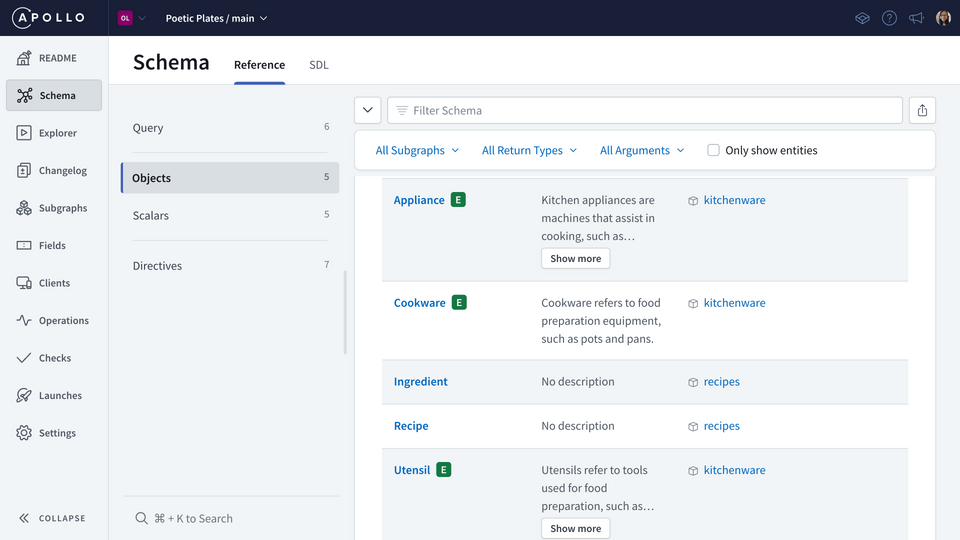
Note: We saw that same label in Explorer, in the Documentation panel, beside any field that returned the Cookware type.
Because it was defined in the kitchenware subgraph, which we didn't clone or run locally, we didn't really see what was happening behind the scenes in the schema file. But that's okay, we actually didn't need to: Studio helped us identify what entity types were available to us!
You can still find the schema file here, if you're interested.
With entities, each subgraph can do one or both of the following:
- Contribute different fields to the entity
- Reference an entity, which means using it as a return type for another field defined in the subgraph
In this course, we'll focus only on learning how to reference an entity. If you're curious to dive deeper into entities and more federation-specific concepts, you can check out the Voyage series.
Referencing an entity
The Cookware type is an entity; we know that we can reference an entity, which means using it as a return type for another field. That's exactly what we want to do with the Recipe.cookware field! Let's try it out.
First, make sure both rover dev processes are still running, as well as the recipes subgraph.
Next, let's open up the schema.graphql file in our recipes subgraph.
Scroll down to find the Recipe type and add the new field at the end.
type Recipe {# ... other Recipe fields"List of cookware used in the recipe"cookware: [Cookware]}
Save your changes! The first rover dev process is listening for changes to that schema.graphql file; when it detects changes, it will re-compose the local supergraph. Let's check out the main rover dev process... oh no! An error!
✨ change detected in ./schema.graphql...🔃 updating the schema for the 'recipes' subgraph in the session🎶 composing supergraph with Federation v2.3.1💀 composition failed, killing the routererror[E029]: Encountered 1 build error while trying to build a supergraph.Caused by:UNKNOWN: [recipes] Unknown type CookwareThe subgraph schemas you provided are incompatible with each other. See https://www.apollographql.com/docs/federation/errors/ for more information on resolving build errors.
We've got a build error "Unknown type Cookware".
That makes sense! We haven't given the recipes subgraph any definition for Cookware, so it doesn't understand what we're referring to yet. Let's go ahead and fix that.
In the same schema file, just below the Recipe type, add the Cookware type. Specifically, we're going to add a stub of the Cookware entity, which contains the minimum fields the recipes subgraph needs to reference it.
To define the stub, we'll add the @key directive after the type definition. This directive is used to define the entity's primary key, which uniquely identifies an instance of an entity. (Giving us a way to tell an object representing a “cast iron skillet” apart from one representing a “wok”, for example!)
type Cookware @key {}
We can find the Cookware type's primary key using Studio. Back in the Schema page, with the Objects list selected, click the Cookware type to see its details. We'll see the name field listed under the Keys section.
Let's jump back to the schema.graphql file. The @key directive needs a fields property, which is set to its primary key (or keys!). In this case, we'll set the fields property to name. Additionally, we'll add the name field inside the type definition, which returns a non-nullable String.
type Cookware @key(fields: "name") {name: String!}
Lastly, since the subgraph doesn't contribute any additional fields to the entity (we're only referencing the entity using its name field, not contributing fields to it!), we need to add one more thing. Inside the @key directive, add another argument for resolvable and set it to false.
type Cookware @key(fields: "name", resolvable: false) {name: String!}
This indicates that the recipes subgraph doesn't define a reference resolver for the Cookware entity. Again, if you're curious to dive deeper into entities and more federation-specific concepts, you can check out the Voyage series!
Let's save our changes and check out the rover dev output again.
✨ change detected in ./schema.graphql...🔃 updating the schema for the 'recipes' subgraph in the session🎶 composing supergraph with Federation v2.3.1✅ successfully composed after updating the 'recipes' subgraph
All is well! Our schema changes have successfully been composed with the other subgraph and the router is working smoothly.
So... we're all done right? 🤔 Let's jump over back to the Sandbox tab which is connected to our locally-running router on http://localhost:4000 and try to run the dream query.
query GetRecipeAndCookwareInformation {recipe(id: "rec3j49yFpY2uRNM1") {namedescriptioningredients {text}instructionscookware {namedescriptioncleaningInstructions}}}
We've got the recipe's details... but scrolling down to the cookware portion of our data... we're seeing null!
Now, it's possible there's just no available information about cast iron skillets. Let's try querying for it directly using the cookware field.
query GetCookware {cookware(name: "cast iron skillet") {namedescriptioncleaningInstructions}}
Looks like we get data back! So... what's the problem?
Resolving the cookware field
Our query resolves data for a specific recipe, but when it gets to the Recipe type's cookware field and tries to resolve it... it has no idea what to do! That's because we haven't written the resolver function for the Recipe.cookware field! Without a resolver function, the recipes subgraph doesn't know what data to return – or even where to find it – when we query for a particular recipe's cookware. Let's fix that!
In the src/resolvers/Recipe.js file, add the following resolver function for the cookware field.
cookware(recipe, _, { dataSources }) {const cookwareNamesList = dataSources.recipesAPI.getRecipeCookware(recipe.id);if (!cookwareNamesList) return;return cookwareNamesList.map((c) => ({name: c,}));},
What's happening here? Let's break it down.
First, the parameters of the resolver. We're using the first parameter parent (renamed as recipe) and the third parameter contextValue (destructured to access dataSources).
Next, inside the body of the function, we're using the dataSource method getRecipeCookware to retrieve a list of the recipe's cookware. This method was already implemented for us.
In the event that no cookware list was available for that recipe (it's possible that it just doesn't use any, or it is missing that data!), we'll return early.
Otherwise, we'll map over the list and for each item, return an object. This object is called an entity representation. It's what the router uses to represent a specific instance of an entity. A representation always includes the typename for that entity and the @key field for the specific instance.
- The
__typenamefield: This field exists on all GraphQL types automatically. It always returns the name of its containing type, as a string. For example,Cookware.__typenamereturns "Cookware". - The
@keyfield: defines the entity's primary key, which uniquely identifies an instance of an entity. We know that theCookwaretype's primary key is itsnamefield.
So, going back to the last line in the Recipe.cookware resolver:
return cookwareNamesList.map((c) => ({name: c,}));
In this case, we've omitted the __typename field because GraphQL takes care of returning that automatically. The cookwareNamesList only has a list of Strings, so we can't simply return that list, as-is. The map function takes care of transforming each item in the list into the shape the router is expecting.
Testing with the local router
Alright, we've got the code changes to back our schema changes! Let's jump back over to Sandbox to check on our local router. We should be getting the full data back for our dream query.
query GetRecipeAndCookwareInformation {recipe(id: "rec3j49yFpY2uRNM1") {namedescriptioningredients {text}instructionscookware {namedescriptioncleaningInstructions}}}
Fantastic, we've got it!
Practice
Use the incomplete schema below to answer the next question.
type Fruit {id: ID!name: StringsoldBy: Vendor}??? {vendorId: ID!}
Key takeaways
- An entity is an object type with fields split between multiple subgraphs. A subgraph can contribute fields to an entity or simply reference it.
- Referencing an entity means using it as a return type for a field defined in the subgraph. To reference an entity, the subgraph must include a stub of the entity definition containing the entity's
@key, which includes the entity's primary field(s) and theresolvableproperty set tofalse. - Additions to the schema may compose successfully, but don't forget to add all code necessary to resolve the new fields!
Up next
Everything is working great locally! Let's push these changes to GraphOS and get our production supergraph up to date.
Share your questions and comments about this lesson
Your feedback helps us improve! If you're stuck or confused, let us know and we'll help you out. All comments are public and must follow the Apollo Code of Conduct. Note that comments that have been resolved or addressed may be removed.
You'll need a GitHub account to post below. Don't have one? Post in our Odyssey forum instead.