Overview
Schema? Check. Locally-running router? Check. Next up—let's send some message events!
In this lesson, we will:
- Learn about the
PubSubclass and its application with subscriptions - Configure our mutation resolver to publish a particular event
Publishing and subscribing to messages
We've added fields to the schema, but right now, there's nothing to take care of resolving them. We need to finish the code for Mutation.sendMessage, which will allow us to send a new message to a particular conversation, as well as for Subscription.messageInConversation, which will notify us whenever a new message is sent.
So how do we tie these two resolvers together? After all, anytime the mutation operation is submitted, we want our subscription to somehow know about it!
We'll solve this problem by equipping our server with a way to both "publish" and "subscribe" to events.
The PubSub class
To both publish and subscribe to events, we'll use a package called graphql-subscriptions. This package gives us an implementation of the publish-subscribe messaging pattern called PubSub. We can create a new instance of this class to start emitting and listening to events, such as changes to our data.
Open up a new terminal to the messages directory and install graphql-subscriptions.
npm install graphql-subscriptions
Note: Your graphql-subscriptions package should install at version 3.0.0 or later. Earlier versions will result in type errors that this course does not cover.
When the installation completes, navigate to the datasources/context.ts file in the messages directory. This file contains the function that sets the context for our server: everything that we return here is made accessible to our resolver functions on their third positional argument, contextValue.
Note: Need a refresher on resolver arguments? Check out our introductory course on GraphQL with TypeScript and Apollo Server.
We want a PubSub instance to be available to all of our resolvers, so this is just the place to instantiate it. At the top of the file, import PubSub from graphql-subscriptions. Then, we'll create a new instance called pubsub.
import { PubSub } from "graphql-subscriptions";const pubsub = new PubSub();
Down in our createContext function, let's include the pubsub property on the object returned.
export const createContext = async ({req,}: StandaloneServerContextFunctionArgument) => {const token = req.headers.authorization || "";const userId = token.split(" ")[1];return {userId,pubsub,dataSources: {db: new PrismaDbClient(),},};};
Note: Using PubSub like this automatically restricts the publishing-subscribing system to a single server instance. In production, you'll want this event system to be shared by all server instances (using something like Redis, rather than merely keeping events in-memory). Check out this page in the official Apollo documentation for a list of PubSub libraries approved for production.
Because we're using TypeScript, we need to make a similar update to our types/DataSourceContext.ts
file.
import { PrismaDbClient } from "../datasources/prisma/client";import { PubSub } from "graphql-subscriptions";// This interface is used with graphql-codegen to generate types for resolvers contextexport interface DataSourceContext {userId: string;pubsub: PubSub;dataSources: {db: PrismaDbClient;};}
Note that we don't need to instantiate PubSub here: because we're providing our type definitions, it's enough merely to pass the class name.
Defining the Mutation resolver
Now that pubsub is available to our resolvers, we can jump to our Mutation and add the logic that triggers a new event.
Open up resolvers/Mutation.ts. We'll find the majority of the function is already provided. Let's go ahead and uncomment it!
This resolver accepts a message and adds it to the database, but it's not yet triggering an "event" we can pick up on in our subscription.
sendMessage: async (_, { message }, { dataSources, userId }) => {const { conversationId, text } = message;const {id,text: messageText,sentFrom,sentTo,sentTime,...messageAttributes} = await dataSources.db.sendMessageToConversation({conversationId,text,userId,});// Return all of the message that was createdreturn {id,text: messageText,sentFrom,sentTo,sentTime,...messageAttributes,};};
Note: If you see some type errors showing up, double check that you saved the changes in your schema.graphql file (the new Subscription type and Mutation fields) then try re-running your subgraph with npm run dev. If you're using VSCode, you can also open up the command palette with Command + P, type > Typescript: Restart TS Server, and hit enter.
To publish an event every time we send a new message to a conversation, we'll use the pubsub instance we put on our server's context. We can access it here by further destructuring the resolver's third positional argument.
sendMessage: async (_, { message }, { dataSources, pubsub, userId }) => {// ... mutation};
Let's trigger our event once a message has been saved to the database successfully. We'll make some space just before returning the message from our function, and await calling the pubsub.publish method, passing in an event string of "NEW_MESSAGE_SENT".
const {id,text: messageText,sentFrom,sentTo,sentTime,...messageAttributes} = await dataSources.db.sendMessageToConversation({conversationId,text,userId,});await pubsub.publish("NEW_MESSAGE_SENT");// Return all of the message that was created
This uses our server's pubsub instance to "publish" an event of type "NEW_MESSAGE_SENT": and anything that's listening for this same type will hear about it! (But nothing's listening for it yet.)
But now we have a TypeScript error to deal with: we're not passing a payload to our pubsub.publish call, and it expects this as a second argument. For now, we'll update it to accept an empty object.
await pubsub.publish("NEW_MESSAGE_SENT", {});
Send some messages
At this point, we should be able to send some messages to a given conversation.
Make sure both your rover dev process and subgraphs are running! Jump over to Sandbox where the local router is running on http://localhost:4000.
Let's run a mutation to send a message to conversation "wardy-eves-chat". We can access the SendMessageToConversation operation we saved in our Operation Collections, or copy-paste the operation below:
mutation SendMessageToConversation($message: NewMessageInput!) {sendMessage(message: $message) {idtextsentTo {idname}}}
And in the Variables panel:
{"message": {"text": "Are you interested in booking another stay aboard?","conversationId": "wardy-eves-chat"}}
And we need to make sure that Headers also includes an Authorization header. (Because it's a chat between wardy and eves, you can alternate which ID you reference below.)
Authorization: Bearer eves
Authorization: Bearer wardy
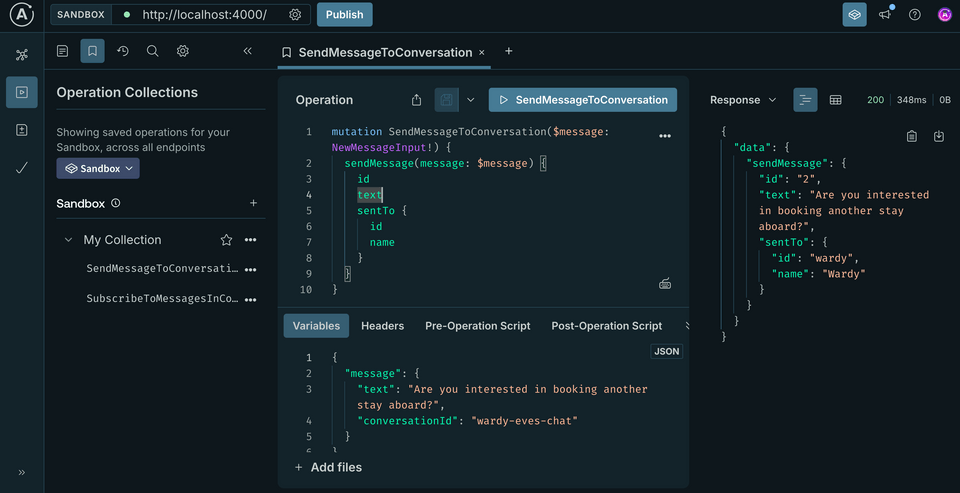
To see the full history of messages sent and received, we can querying for conversations we're a part of. Run the query below to retrieve a list of conversations along with their messages.
query GetConversations {conversations {messages {textsentFrom {id}}}}
And we need to make sure that Headers also includes an Authorization header.
Authorization: Bearer eves
Everything working? Let's move on!
Practice
PubSub are true?Key takeaways
- The
PubSubclass from thegraphql-subscriptionslibrary is an implementation of the Publish/Subscribe pattern, which allows us to "publish" events in one resolver and "subscribe to" them in another. - When calling the
PubSubpublishmethod, we pass along a specific event name along with a payload argument. - In production environments, we should use a
PubSubimplementation backed by an external storage solution (such as Redis) so that all server instances can access the same store of events.
Up next
We've got our mutation set up to publish events. In the next lesson, we'll hook up the last piece: subscribing to those events.
Share your questions and comments about this lesson
Your feedback helps us improve! If you're stuck or confused, let us know and we'll help you out. All comments are public and must follow the Apollo Code of Conduct. Note that comments that have been resolved or addressed may be removed.
You'll need a GitHub account to post below. Don't have one? Post in our Odyssey forum instead.