Overview
We can query for a listing's amenities, but only through the listing(id: ID) root field, not through featuredListings. What's going on?
In this lesson, we will:
- Learn about resolver chains
- Learn about the
parentargument of a resolver
Examining the data source response
Let's examine the response from our GET /featured-listings endpoint again. Open a new browser tab, and paste in the URL below.
https://rt-airlock-services-listing.herokuapp.com/featured-listings
The array that we get back contains the listings objects that we expect; but we'll notice that one property in each listing object is different! From the /featured-listings endpoint, a listing's list of "amenities" is an array that contains just the identifier for each amenity. No additional data!
This is a common pattern in REST APIs. Imagine if the amenities list for each listing included the full data for each amenity. That would make for a very large response, to have a list of listings and a list of full amenities for each listing! The problem would compound if the endpoint decided to return even more featured listings than the three we already have.
To make sure that we can return featured listings along with their amenities, we'll need to make one additional call per listing to the REST API. In this case, to a new endpoint: GET /listings/{listing_id}/amenities.
The next question becomes: where in our code will we make that call?
Accounting for missing amenities
To account for our missing amenities, we could update the getFeaturedListings data source method. We might give it some extra logic to reach out to GET /listings/{listing_id}/amenities to fetch this extra data.
async getFeaturedListings(): Promise<Listing[]> {const listings = await this.get<Listing[]>("featured-listings");// for each listing ID, request this.get<Amenity[]>(`listings/{id}/amenities`)// Then map each set of amenities back to its listingreturn listings;}
Well, this would work; but it would mean that every time we query for featuredListings, we would always make an additional network call to the REST API, whether the query asked for a listing's amenities or not.
So instead, we're going to make use of the resolver chain.
Following the resolver chain
A resolver chain is the order in which resolver functions are called when resolving a particular GraphQL operation. It can contain a sequential path as well as parallel branches.
Let's take an example from our project. This GetListing operation retrieves the title of a listing.
query GetListing($listingId: ID!) {listing(id: $listingId) {title}}
When resolving this operation, the GraphQL server will first call the Query.listing() resolver function, which returns a Listing type, then the Listing.title() resolver which returns a String type and ends the chain.
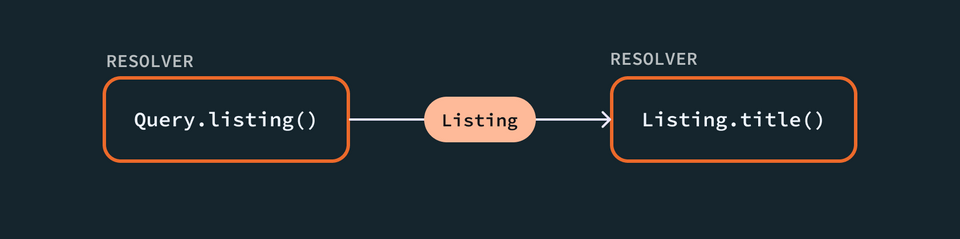
Note: We didn't need to define a separate resolver for Listing.title because the title property can be found directly on the object returned by Query.listing.
Each resolver passes the value it returns to the next function down, using the resolver's parent argument. Hence: the resolver chain!
Remember, a resolver has access to a number of parameters. So far, we've used contextValue (to access our ListingAPI data source) and args (to get the id for a listing). parent is another such parameter!
In the example above, Query.listing() returns a Listing object, which the Listing.title() resolver would receive as its parent argument.
Let's look at another GraphQL operation.
query GetListingAmenities($listingId: ID!) {listing(id: $listingId) {titleamenities {name}}}
This time, we've added more fields and asked for each listing's list of amenities, specifically their name values.
Our resolver chain grows, adding a parallel branch.
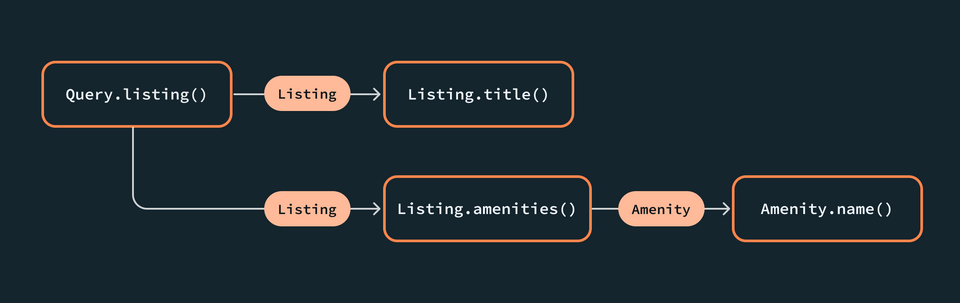
Because Listing.amenities returns a list of potentially multiple amenities, this resolver might run more than once to retrieve each amenity's name.
Following the trail of the resolver, Listing.amenities() would have access to Listing as the parent, just as Amenity.name() would have access to the Amenity object as the parent.
If our operation didn't include the amenities field (like the first example we showed), then the Listing.amenities() resolver would never be called!
Implementing the Listing.amenities resolver
So far, we've defined resolver functions exclusively for fields that exist on our Query type. But we can actually define a resolver function for any field in our schema.
Let's create a resolver function whose sole responsibility is to return amenities data for a given Listing object.
Jump into resolvers.ts. Here, we'll add a new entry, just below the Query object, called Listing.
export const resolvers: Resolvers = {Query: {// query resolvers, featuredListings and listing},Listing: {// TODO},};
Inside of the Listing object, we'll define a new resolver function called amenities. Right away we'll return null so that TypeScript continues to compile as we explore our function's parameters.
Listing: {amenities: (parent, args, contextValue, info) => {return null;}},
We know the value of the parent argument—by following the resolver chain, we know that this resolver will receive the Listing object that it's attempting to return amenities for. (We won't need the args or info parameters here, so we'll replace args with _ and remove info from the function signature.)
Let's log out the value of parent.
Listing: {amenities: (parent, _, contextValue) => {console.log(parent);return null;}},
Then we'll return to Sandbox to run a query that will call this resolver function.
query GetFeaturedListings {featuredListings {idtitledescriptionamenities {idnamecategory}}}
When we run this operation, the Response panel will show "Cannot return null for non-nullable field Listing.amenities.", but that's ok, we're more interested in investigating parent right now.
We can see from the value we logged out in the terminal that parent is the Listing object that we queried for—along with all of its properties. Now within the Listing.amenities resolver, let's clean up our log and return statements. Then we'll destructure parent for its id and amenities properties, and contextValue for its dataSources.
Listing: {amenities: ({ id, amenities }, _, { dataSources }) => {// TODO}},
There are two scenarios we need our Listing.amenities resolver to handle.
- If we've queried for a single listing, we'll already have full amenity data available on the
parentargument. In this case, we can return theamenitiesdirectly. - If our resolver's
parentargument comes fromQuery.featuredListings, however, we'll have only an array of amenity IDs. In this case, we'll need to make a follow-up request to the REST API!
Listing: {amenities: ({ id, amenities }, _, { dataSources }) => {// If `amenities` contains full-fledged Amenity objects, return them// Otherwise make a follow-up request to /listings/{listing_id}/amenities}},
Let's build out our new ListingAPI method for amenity data, and then we'll return to handle these two paths.
The getAmenities method
In listing-api.ts, let's bring in our Amenity type from types.ts.
import { Listing, Amenity } from "../types";
We'll give our class a new method: getAmenities. This method accepts a single argument, a listingId, which is a string, and returns a Promise that returns a list of Amenity types.
getAmenities(listingId: string): Promise<Amenity[]> {// TODO}
Inside the function, we'll call this.get, which returns a list of Amenity types, and pass in the endpoint we need.
getAmenities(listingId: string): Promise<Amenity[]> {return this.get<Amenity[]>(`listings/${listingId}/amenities`);}
Finishing the resolver
Then, back in our Listing.amenities resolver, we'll make a call to the listingAPI.getAmenities method, passing in our Listing's id.
amenities: ({ id, amenities }, _, { dataSources }) => {return dataSources.listingAPI.getAmenities(id);},
We've taken care of the scenario when we need to request follow-up amenity data. Now, let's update our resolver to first check whether we already have full amenity data available on the parent argument.
We've provided a utility that helps us do just that. Jump into src/helpers.ts and uncomment the code there. We'll use the validateFullAmenities function exported here: it takes an amenityList parameter (a Amenity[] type), and checks to see whether at least some of the objects in the array provided contain a name property.
export const validateFullAmenities = (amenityList: Amenity[]) =>amenityList.some(hasOwnPropertyName);
Note: We made the arbitrary choice to check for the presence of a name property (to determine whether we're dealing with complete amenity data), but we could have just as well used the category property instead to perform the check.
Back in resolvers.ts, let's import the validateFullAmenities function.
import { validateFullAmenities } from "./helpers";
Down in our Listing.amenities resolver, we'll first check whether our amenities contain all their properties. If so, we'll return them directly. Otherwise, we can make our follow-up request for additional amenity data.
amenities: ({ id, amenities }, _, { dataSources }) => {return validateFullAmenities(amenities)? amenities: dataSources.listingAPI.getAmenities(id);},
Trying out our queries
To see when our ListingAPI's getAmenities method gets called for follow-up amenity data, let's add a console log inside the method in listing-api.ts.
getAmenities(listingId: string): Promise<Amenity[]> {console.log("Making a follow-up call for amenities with ", listingId);return this.get<Amenity[]>(`listings/${listingId}/amenities`)}
Now we can return to Explorer at http://localhost:4000 and try out a few queries.
First, a query for an individual listing.
query GetListing($listingId: ID!) {listing(id: $listingId) {amenities {idname}}}
And in the Variables panel:
{"listingId": "listing-1"}
When we run this query, we should see that the response for a single listing and its amenities hasn't changed. Our resolver simply returns amenities from the parent argument.
Now let's try the same thing for our featured listings query. Open up a new tab in the Explorer, and paste in the following query.
query GetFeaturedListings {featuredListings {idtitledescriptionamenities {idnamecategory}}}
Now when we run this query, we'll still see amenity data—but our terminal shows that three additional requests have been made to populate the remaining properties for each listing's set of amenities!
Making a follow-up call for amenities with listing-1Making a follow-up call for amenities with listing-2Making a follow-up call for amenities with listing-3
Practice
Use the following schema and GraphQL query to answer the multiple choice question.
type Query {featuredPlanets: [Planet!]!}type Planet {name: String!galaxy: Galaxy!}type Galaxy {name: String!totalPlanets: Int!dateDiscovered: String}
query GetFeaturedPlanetsGalaxies {featuredPlanets {galaxy {name}}}
GetFeaturedPlanetsGalaxies query above?Key takeaways
- A resolver chain is the order in which resolver functions are called when resolving a particular GraphQL operation.
Up next
Feeling confident with queries? It's time to explore the other side of GraphQL: mutations.
Share your questions and comments about this lesson
Your feedback helps us improve! If you're stuck or confused, let us know and we'll help you out. All comments are public and must follow the Apollo Code of Conduct. Note that comments that have been resolved or addressed may be removed.
You'll need a GitHub account to post below. Don't have one? Post in our Odyssey forum instead.