Troubleshoot faster with the GraphOS Router Support Tool

Danielle Mallare
Today we’re introducing the GraphOS Router Support Tool, a new way to package up a diagnostic snapshot of your GraphOS Router and its Kubernetes environment, including router version and config, logs, pod health, and metrics, into a single sanitized archive, on demand, without affecting your router.
This first release covers on-demand collection from any Kubernetes-hosted router deployment, with automatic redaction and local or customer-owned object storage.
The problem it solves
Getting the full picture when something goes wrong has historically meant a manual, back-and-forth process: kubectl describe, hunting down router.yaml, grepping logs, screenshotting a dashboard. The Router Support Tool gathers all of it in one pass, often enough to diagnose and fix the issue yourself, and if not, exactly what a support ticket needs. This includes:
- Router version and startup configuration
- Current and previous-container logs (so a router that already restarted still has its history captured)
- Pod status, restart counts, and resource limits
- A point-in-time Prometheus metrics snapshot, if you expose one
- Sanitized
router.yaml
You generate and store the bundle entirely within infrastructure you control, locally on disk, or in a bucket you own. Apollo only sees it if and when you choose to share it during a support engagement.
How did we build this?
The support tool is built on top of troubleshoot.sh, the open-source Kubernetes support-bundle framework, so collection and redaction are handled by their engine. What we’ve added is everything around it: what to collect, how the spec reaches your cluster, how you trigger a collection, and where the resulting bundle goes. We have also built custom redactors that ensure that sensitive information is stripped automatically, on top of troubleshoot.sh’s own built-in redaction.
A few things we built in deliberately:
- Generic secrets are stripped automatically, on every file, with no configuration. Environment-variable-named secrets (password, token, *_SECRET_ACCESS_KEY, and similar), credentials embedded in URLs, and database connection strings are all redacted unconditionally, before the bundle is written.
- Router-specific sensitive fields get their own redaction rules, because generic pattern-matching doesn’t know your
router.yaml‘s shape. This covers JWT verification and subgraph auth configuration, literal header values in your headers config, GraphQL operation bodies that reach router logs, subgraph routing URLs, and Redis credentials, whether embedded in a cache connection string or set as separate username/password fields. - It’s safe to run against a router that’s already degraded. Every collector gathers its signal externally, from the Kubernetes API, kubelet metrics, or an HTTP endpoint, rather than executing inside your router’s container, so running the tool doesn’t compete with your router process for CPU or memory.
How to set it up
Generating a support bundle is done through a single Helm chart, router-diagnostics-chart, with a mode value controlling how collection actually runs.
| mode: local | mode: job | |
| Who runs collection | You, from your own machine, with your own kubectl access | A Kubernetes Job, in-cluster, using its own ServiceAccount |
| What gets installed | Spec ConfigMap | Spec ConfigMap + Job + ServiceAccount/RBAC (namespace-scoped and cluster-scoped) |
| Where the bundle lands | Your current directory | S3 (or an S3-compatible store), GCS, or a bare HTTP(S) endpoint you configure |
| Use when | You have kubectl access to production | Your kubectl access is restricted and a platform team runs it on your behalf |
Running the tool
Install a small Helm chart and point it at your router, with out-of-the-box support for the official Apollo router Helm chart and a bit more configuration for raw manifests or custom deployments.
From there, you choose how the support bundle is collected: locally, with a script, from your own machine with kubectl access, producing a bundle on your filesystem, or as a Kubernetes Job, running in-cluster against your live router pods, for teams whose access to production is more restricted. Both paths collect the same information, only how and where it runs and where the bundle lands differ.
Collection is on-demand, you (or your platform team) kick it off when you need it, whether that’s in response to an incident or just to capture a healthy baseline for comparison later.
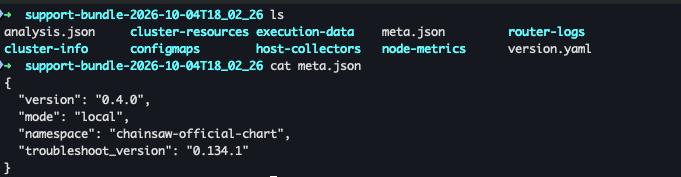
The tool produces a single artifact: support-bundle-2026-09-11T14_32_00.tar.gz, for example, a bundle collected with mode: local is shown below:
From there, it’s yours. Inspect it, keep it, or attach it to a support ticket.
FAQ
Does this restart my router?
No. Collection never touches a running router process. Everything is gathered from outside the container.
Does Apollo automatically receive my bundle?
No. When running the tool locally (mode: local), the bundle is always written to your own machine. When run as a Job (mode: job), you choose the destination yourself: S3 (or an S3-compatible store), GCS, or a bare HTTP(S) endpoint you control. Either way, the bundle lands entirely within infrastructure you control. Apollo only sees it if and when you choose to share it with us.
What gets redacted?
Tokens, credentials, connection strings, and generic secrets are stripped automatically on every file, along with router-specific values like JWT/auth configuration, header literal values, operation bodies in logs, subgraph URLs, TLS private keys, and Redis credentials. No configuration is required — redaction runs by default on every collection.
Does this work outside Kubernetes?
Not in this release. Other types of deployments such as ECS, Fargate, and standalone VM deployments are not supported.
Can I run this with the Apollo GraphOS Operator?
Not in this release, but support for the Apollo GraphOS Operator is on the roadmap.
Get started
The Router Support Tool is available today. To try it out:
- Check out our documentation for a step by step guide.
- Have questions or hit an edge case? Share your feedback in the Apollo Community.
We built this because “can you send us your router config and logs” shouldn’t be the first hour of every support conversation. Let us know what you’d like to see it collect next.


