Introducing Apollo’s Runtime Testing Framework

Innes Anderson-Morrison
“Testing distributed systems is easy”, said no software engineer ever.
What about testing a core component of the distributed systems of thousands of organizations, in all the scenarios it could possibly encounter, without knowing precise details of those scenarios? That’s clearly a non-starter, but what we can do is look at the problem from a new angle and tackle it in a way that is flexible enough for us to adapt to individual use cases as and when we need to. In this blog post we’ll introduce you to Apollo’s Runtime Testing Framework (RTF), provide a bit of the motivation and back story for why it works the way it does and show you how we’ve been using it to ensure that GraphOS Router releases are ready to meet your production workloads head on.
This is part one of a two part series on how we are improving our performance testing and release quality gates here at Apollo. Part two covers how we make use of the RTF to performance test the GraphOS Router.
We have performance tests, yes. But what about more performance tests?
While it is important to identify the performance characteristics of services like GraphOS Router in isolation, we are acutely aware that for any real world use case what actually matters is the performance of that service when it is embedded within the wider distributed system the customer is operating.
With the level of variation we see in how our customers build their supergraphs and deploy the router, it is a daunting task to evaluate the performance of new builds and vet them for production service. Historically we have done this by running the router with a set of different configurations and supergraphs that aim to cover the spectrum of known customer use cases. While far from being exhaustive, this gave us a clean way to compare different builds of the router, release over release and identify changes in performance.
This approach served us well in the past, but it was specific to testing the router under a fixed deployment topology and processing the results was both time consuming and manual. As Apollo’s runtime continues to evolve we need a way to run this sort of testing for any of our services under a variety of deployment configurations. Ideally we also shouldn’t require different engineering teams to re-invent the wheel when it comes to writing and maintaining performance tests, so a shared approach to writing and running these tests is needed.
With that in mind, we put together a wishlist for the kind of system we wanted to work with. Given that the goal was to move beyond “just” performance testing the router we knew that we were going to need something flexible, so we settled on two guiding principles:
1. One size fits most, not all
Aiming to provide a working “out of the box solution” for every capability we came across would inevitably result in chasing a long tail of infrequently used aspects of the system that would bitrot or be insufficiently tested.
No one wants that.
Instead we decided to focus on paving a path for the core capabilities that we knew were actively required by Apollo engineers, while ensuring that the system remained open to extension. As and when new shared capabilities were needed we would work with those teams to pull them into the framework and support them.
2. Build a compositional toolkit
The existing system we had was tailor made for performance testing the router. Perfectly fine for tackling that initial capability but moving beyond that pretty much required starting again from scratch.
We couldn’t afford to keep doing that, so whatever we built this time needed to be aimed at supporting engineers in writing and maintaining new tests while leveraging the work that had already gone into existing ones.
Yes, “composition over inheritance” is a well trodden OOP pattern. Nothing we were proposing was radically new, and that’s kind of the point.
So what is the Runtime Testing Framework?
At its core, RTF is a set of tools and libraries which provide a glue layer that allows us to write and maintain tests that target deployed services. If what you are interested in is unit testing or limited to a single service, RTF is almost certainly going to be overkill. But, once you find yourself needing to bring up something approximating a full production environment (as we do for GraphOS Router performance tests) you’ll quickly see that RTF handles a lot of the boilerplate around the configuration and infrastructure side, leaving you free to focus on the tests themselves.
All tests run under RTF follow the same high level structure:
- Configure and deploy the environment you want to test
- Run tests against that environment
- Gather output and metrics
- Tear the environment down and return the results
Everything is written declaratively, making tests self contained and reproducible. This makes things easier for us to run while also avoiding the all too common issue of relying on hand configured test environments that have a nasty habit of evolving over time.
From the point of view of an engineer using it to write and run performance tests at Apollo, RTF has two execution modes:
- A CLI that allows them to validate and run declarative Test Plans locally on their laptop
- An internally deployed Orchestrator service that can take those Test Plans and run them at scale in ephemeral Kubernetes namespaces
Importantly, both execution modes are driven from the same configuration format: the Test Plan. This allows engineers to iterate locally on writing their tests and checking that they are running as intended before pushing them up to the Orchestrator for running them at scale. Arguably more importantly, RTF also leverages existing technologies wherever possible in order to avoid re-inventing the wheel.

To see how that works, let’s take a look at how to write a simple Test Plan.
What do you want to test and how do you want to test it?
Before we can write a test, we need to know what we’re testing. The term RTF uses for this is your Environment. The default and recommended way to define your Environment is as a set of docker-compose files. When run on a laptop, the RTF CLI makes use of local docker-compose to handle spinning your desired services up and down around your tests, with the same config getting mapped to Kubernetes resources via kompose when run under the Orchestrator. In cases where we need more fine grained control over exactly how resources are deployed we also support defining an Environment in terms of Kubernetes manifests, but this mode is only supported under the Orchestrator.
For the test itself we have a Scenario expressed in terms of a docker image and command to execute inside of that image. Both the Scenario and Environment support a limited form of variable templating that allow the user triggering a test run to parameterise the execution of that test by specifying things like resource limits, graph refs or any other aspect of the Test Plan that the author chose to support.
While that’s already quite useful, if that were all there was to RTF then it might as well be a simple shell script. The fact that we’re writing a blog post about this should be an indicator that there is a little more going on than that.
Declarative test resources
The “framework” part of RTF comes into play when you start making use of something we call File Providers. These are declarative representations of the resources needed for spinning up the test environment or running the test itself, and how RTF ensures that a Test Plan is self contained (vital for when we need to run it in a cluster!).
There are a number of built-in providers at this stage, ranging from pulling in other files to synthesizing commonly used test data such as supergraph schemas and GraphQL operations or dynamically producing file content using a shell script. Talking about how this all works entirely in the abstract is tricky, so let’s take a look at the file providers we typically use for deploying the router:
file_providers:
  - name: nginx.conf
    env_var: NGINX_CONFIG
    kind: relative_path
    path: data/nginx.conf

  - name: subgraph-config.yaml
    env_var: SUBGRAPH_CONFIG_FILE
    kind: relative_path
    path: data/subgraph-config.yaml

  - name: router-config.yaml
    env_var: ROUTER_CONFIG
    kind: merge_yaml
    base:
      kind: relative_path
      path: data/base-router-config.yaml
    overrides:
      - kind: graphos_subgraph_router_url_overrides
        graph_ref: "{{ graph_ref }}"
        url_format: "docker"

  - name: supergraph.graphql
    env_var: SUPERGRAPH_SCHEMA
    kind: graphos_supergraph
graph_ref: "{{ graph_ref }}"- The relative_path provider allows us to reference other local files within the git repo containing the test plan. When running under the Orchestrator, these are automatically converted to pull the relevant files from GitHub.
- The merge_yaml provider does pretty much what you’d expect, merging a set of overrides into a base YAML file. In this case, a base configuration file for the GraphOS Router and overrides for the locations of the subgraphs to point the router are our mock subgraph servers.
- And last but not least, the graphos_supergraph provider pulls the requested supergraph from GraphOS Studio so it can be used by both the router and subgraph servers to serve the graphQL schema we are using for the test.
The “{{ graph_ref }}” syntax used in the last two providers is an example of RTF’s variable templating. Variables can be set statically within the test plan itself or dynamically at runtime when triggering a test run, allowing for quick and easy parameterisation of tests without having to edit and commit changes to the Test Plan being used.
There is also support for providing variables in the form of a matrix (similar to GitHub Actions’ matrix strategy), which is how we re-use a single test setup to validate the router’s performance against a set of configuration setups, resource limits, traffic patterns and supergraphs. When running locally this results in each of these Test Plan variants being executed sequentially. Useful, but time consuming once you start getting into the 100s of variants – as most of our real tests do.
That alone is motivation for the in-cluster execution model of the Orchestrator, even before the benefits of a stable consistent test environment are taken into account. So, let’s move on to how we run tests at scale!
Goodbye laptop, hello cluster
In order to ensure that we are running in a stable, production-like environment we run all tests where we care about how they execute (as opposed to merely a pass/fail status) under the internal Orchestrator service. For the most part, the execution model is the same: provision the resources needed for the test, run the test test, clean up the resources. What changes is the fact that the Orchestrator handles this using ephemeral Kubernetes namespaces that are created for each variant of the Test Plan being run.
The Orchestrator itself is only available internally to Apollo engineers and makes use of other internal systems that provide the “cluster farm” abstraction we need to quickly and easily reconfigure the set of available workload clusters used for executing test runs. Test Plans are registered via their location in GitHub and can be triggered directly from the Orchestrator’s API or via one of the GitHub actions we provide for running Test Plans as part of CI.
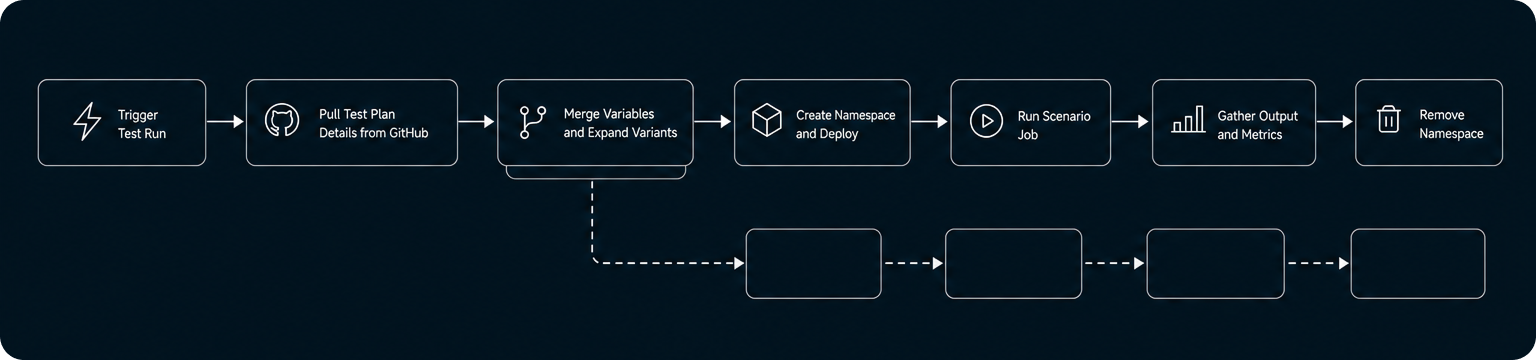
When triggered, a Test Plan is pulled from GitHub and its matrix is expanded to generate a set of variants which are dropped into a job queue for processing. Each variant results in an Argo Workflow being run to create a new ephemeral namespace in one of the workload clusters into which the variant’s Environment is deployed, with file provider data being supplied via an init container that writes the requested file content out into a shared volume.
The Scenario itself runs as a Kubernetes Job and once it completes (successful or otherwise) the output from the test along with any requested metrics scraped from the cluster are bundled up and pushed to GCS for storage.
We leverage existing Kubernetes technologies wherever possible to handle the heavy lifting of deployment, metrics collection, secrets management etc. Within the Orchestrator’s job queue, every test run and each of the individual variants being executed maintain a status and activity log in order to allow engineers to pinpoint exactly when and where something goes wrong should a test fail to run successfully.
To make everything easier to work with, we also provide a simple front end that runs alongside the Orchestrator, allowing engineers to review past and current test runs, browse registered Test Plans and access results. The status and activity logs provide a live dashboard view of all of the workloads currently in flight, with the goal being for it to be as easy as possible to write, maintain and work with these kinds of tests.
In part two of this blog series, we’ll show how we put the Runtime Testing Framework to work for GraphOS Router performance testing. We’ll walk through the test setup, how we validate results across different router releases, and what we’ve learned from running these tests at scale.


