What’s new in Graph Artifacts

Zack Warnimont
When we launched Graph Artifacts, we gave teams a way to pin their GraphOS Router to a specific, immutable supergraph schema version using SHA digests. Graph artifacts are stored using OCI-compliant registries, and tagging is a native concept at that layer. A tag is just a mutable pointer to an immutable digest. In principle, nothing stopped a team from tagging an artifact prod and having their router resolve it.
In practice, almost no one could do that through the GraphOS tools they actually used day to day. Rover had no way to assign one, list one, or fetch an artifact by one. And Studio’s Launches page didn’t show which artifact a tag pointed to, or that tags existed at all. To see that, you had to call the Platform API directly, dropping out of Rover and Studio entirely. That forced teams to write custom scripts against the OCI API to get tag-like behavior back. Graph artifacts were meant to streamline promotion and rollback, but in practice the workflow still requires the same manual steps it did before artifacts existed.
This release closes that gap. It spans three parts of the platform:
- Managing tags from Rover. Native CLI commands to assign, list, fetch, and delete tags, so promotion and rollback become one-line operations instead of maintaining in-house scripts that manage deployment.
- Discovering tags in Studio. The Launches page now surfaces tags alongside artifact digests, so you can answer “what’s tagged prod right now?” without leaving the browser.
- Standing on OCI standards. Tags are backed by OCI-compliant registry APIs under the hood, so tools like oras and any other OCI-aware client work with them the way they’d expect from any container registry.
How tags behave in GraphOS
A couple of things are specific to how GraphOS and the GraphOS Router work with tags, worth knowing before you start using them:
- Apollo-managed vs. user-managed. Apollo-managed tags (such as variant auto-tags) are system-generated to track the latest publish for a variant and are immutable. User-managed tags are yours to assign, move, or delete as your promotion workflow dictates.
- Hot-reload depends on your router version. On Router v2.11.0+, a tag reassignment hot-reloads automatically. On earlier versions, the router still needs a restart to pick up the change.
Managing tags in Rover
Rover 0.41 ships with a full set of rover graph-artifact tag commands, so tags can be managed entirely from the CLI or from CI/CD.
1rover graph-artifact tag --graph-id my-graph --digest 'sha256:01ba4719c80b6fe911b091a7c05124b64eeece964e09c058ef8f9805daca546b' prodList tags for a variant at a glance:
rover graph-artifact list-tags --graph-id my-graph

TAG         DIGEST                                       CREATED
prod        sha256:6c3c624b58cd32b4c53f041e94d...        2026-07-10T14:30:00Z
canary      sha256:a1b2c3d4e5f678901234567890ab...       2026-07-09T09:15:00Z
v1.2.3      sha256:6c3c624b58cd32b4c53f041e94d...        2026-07-08T11:00:00Z
Inspect a tag and the artifact it points to:
rover graph-artifact fetch --graph-id my-graph --tag-name prodDelete a tag when it’s no longer needed (the underlying artifact is unaffected):
rover graph-artifact untag --graph-id my-graph canaryThese slot naturally into a promotion pipeline:
# 1. After checks pass, tag the artifact as canary
- run: rover graph-artifact tag --graph-id my-graph --digest $ARTIFACT_DIGEST canary

# 2. After canary validation passes, promote to production
- run: rover graph-artifact tag --graph-id my-graph --digest $ARTIFACT_DIGEST prod

# 3. Clean up the canary tag
- run: rover graph-artifact untag --graph-id my-graph canary
Verify your change: Run rover graph-artifact fetch --graph-id my-graph --tag-name prod to confirm the tag is pointing to the correct digest.
Discovering tags in Studio
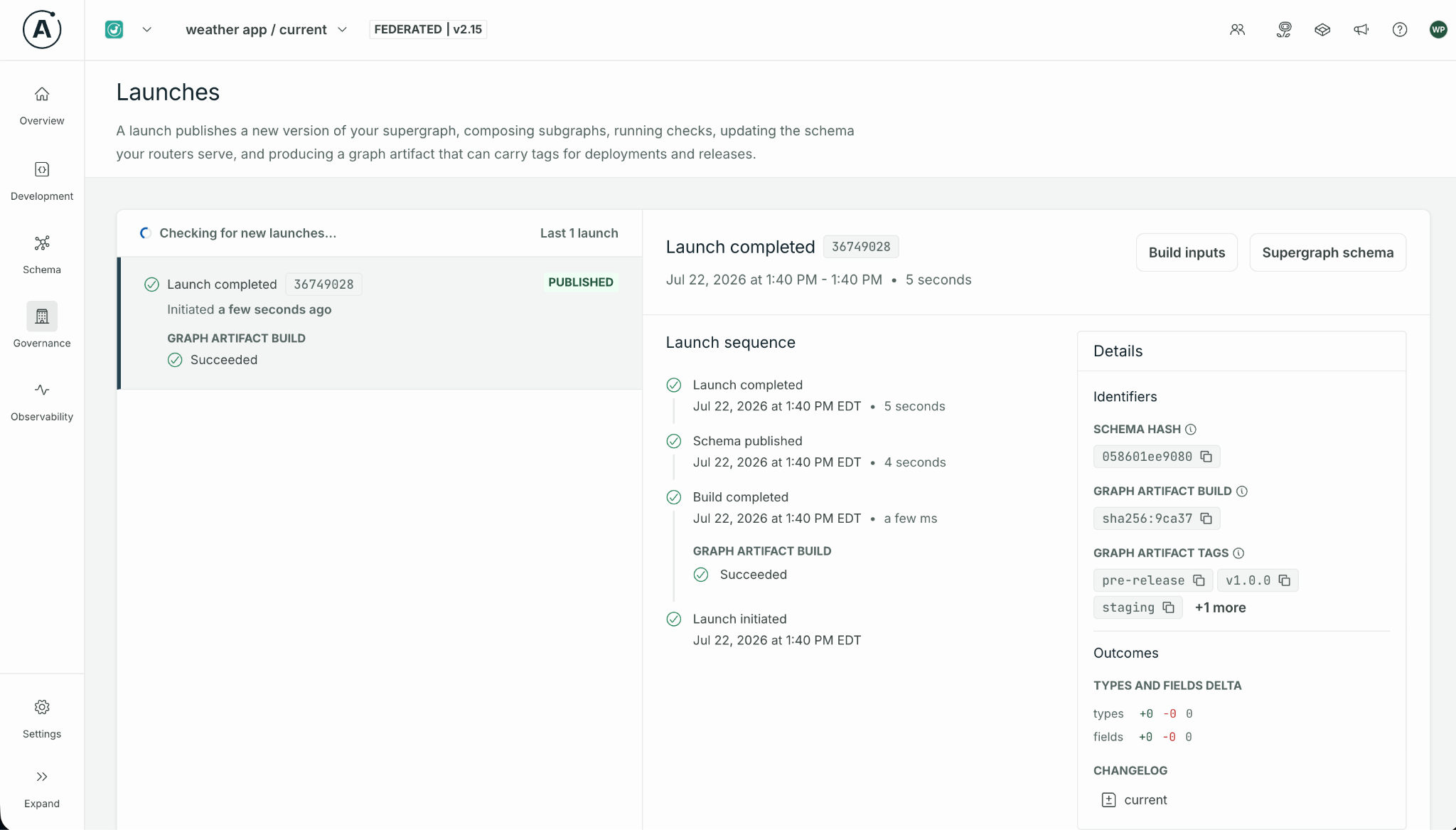
In Studio, the Launches page now surfaces tag information right alongside each artifact’s digest, so when you’re looking at a specific launch, you can see at a glance which tags point to that build. No terminal required.
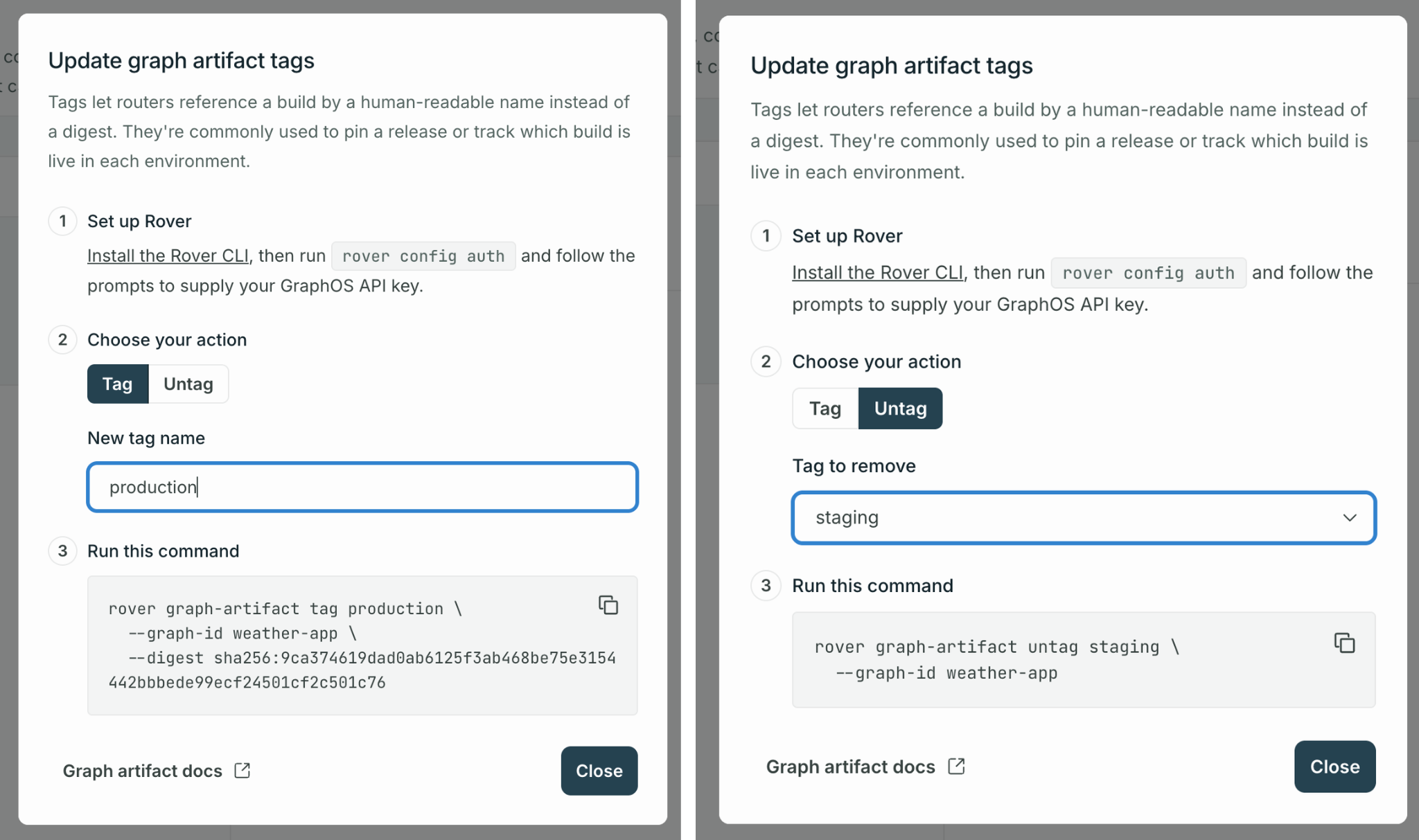
We’ve also made it easier to act on what you find: graph admins can generate the exact Rover command, complete with --graph-id and --digest , to tag or untag an artifact, ready to copy into your terminal and run. If you need more context, you can find a link to the Rover graph artifact docs as well.
Built on OCI standards
Under the hood, graph artifact tags are backed by OCI-compliant registry APIs. That means tools like oras and other OCI-compatible clients can interact with tags through standard endpoints: listing tags, pulling by tag, and pushing with a tag all work the way you’d expect from any container registry.
For Enterprise customers who mirror artifacts to a private OCI registry, tags are preserved during the copy, so the experience stays consistent across GraphOS and your own infrastructure.
Getting started
- Update Rover to version 0.41 or later.
- Assign your first tag. After your next subgraph publish, find the artifact digest on the Launches page in Studio or via
rover graph-artifact list, then run:
rover graph-artifact tag --graph-id my-graph --digest <sha> prodUpdate your router config to reference the tag instead of the digest:
APOLLO_GRAPH_ARTIFACT_REFERENCE="artifacts.api.apollographql.com/my-graph:prod"Wire it into CI/CD. Use rover graph-artifact tag in your pipeline to automate promotion.
What this adds up to
Graph artifacts already gave teams a deterministic, tamper-proof way to deploy schema changes. Now Rover and Studio catch up. Rover has a CLI surface for tags that matches what the registry already supported underneath, so promotion and rollback don’t require a workaround anymore. And Studio’s Launches page finally shows which artifact a tag points to, so that information doesn’t require going around GraphOS to find.
Graph artifact tags are available now for all GraphOS customers. Update to Rover 0.41 and start tagging.
For the full reference, see the Graph Artifacts documentation and the Rover artifact CLI (v0.41.0) docs.
Note: Wendy Peralta and Ana De Magalhães also contributed to this blog post.


