What’s new in Schema Proposals

Ana De Magalhães
Schema proposals are how teams running Apollo GraphOS coordinate changes to their graph: a place to draft a schema change, talk about it, review it, and ship it with confidence. As more teams have moved their schema work into proposals, and into the developer workflows and automations they build around them, we’ve spent the last several months listening closely to how that work actually flows.
This release is the result of that listening. It spans four parts of the product:
- Working on a proposal. Improvements to authoring and reviewing in Studio: navigating long diffs, understanding what changed, commenting in context, resolving conflicts without leaving the editor, and flagging inaccurate diffs.
- Better webhook notifications. Richer payloads and two new event types give your integrations the full picture of what happened, who triggered it, and where to look.
- Building on a reliable API. Robust updates to our API that provide more precise coverage detection and reliable data for your automated pipelines.
- Strengthening our foundations. Deeper consistency improvements that remove UI ambiguity and make the proposal workflow more predictable and stable.
Working on a proposal
This is the part of schema proposals where the work actually happens, whether you’re drafting changes or reviewing them. What follows is about that motion itself: moving through a diff, understanding what changed, commenting, and handling conflicts.
Most of what changed here came out of close conversations with the platform teams who use proposals most, about how authors and reviewers actually spend their time.
Moving through a diff
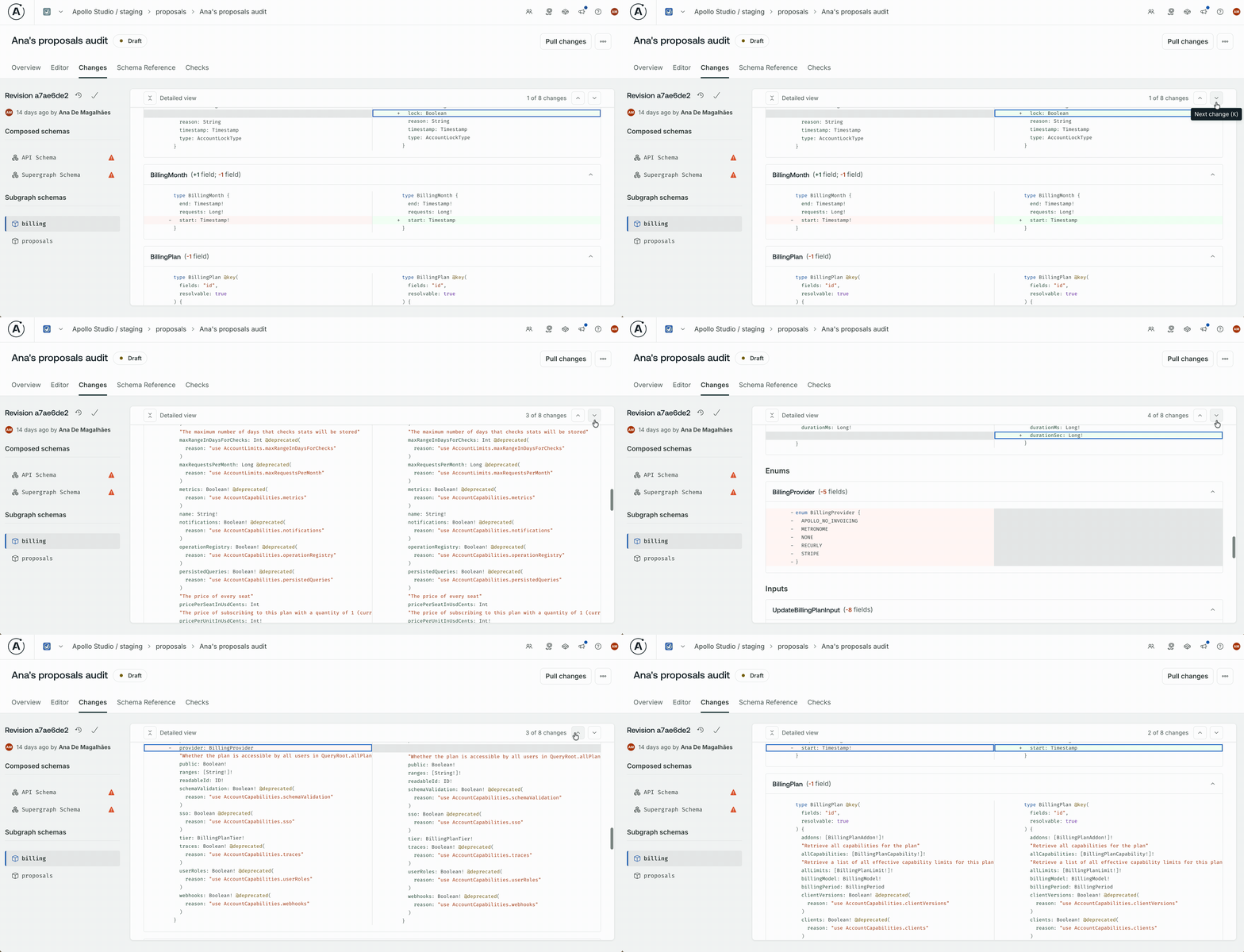
Working through a long proposal should keep your attention on the schema changes, not on the mechanics of getting to them. Long proposals now have a change navigator: the up and down arrows, or J and K from the keyboard, step you through every change in the diff, with a counter showing where you are in the sequence. When you scroll past the top of the changes section, a compact sticky bar follows you with the navigator, plus an expand-all / collapse-all toggle for the detailed views.
Understanding what’s actually different
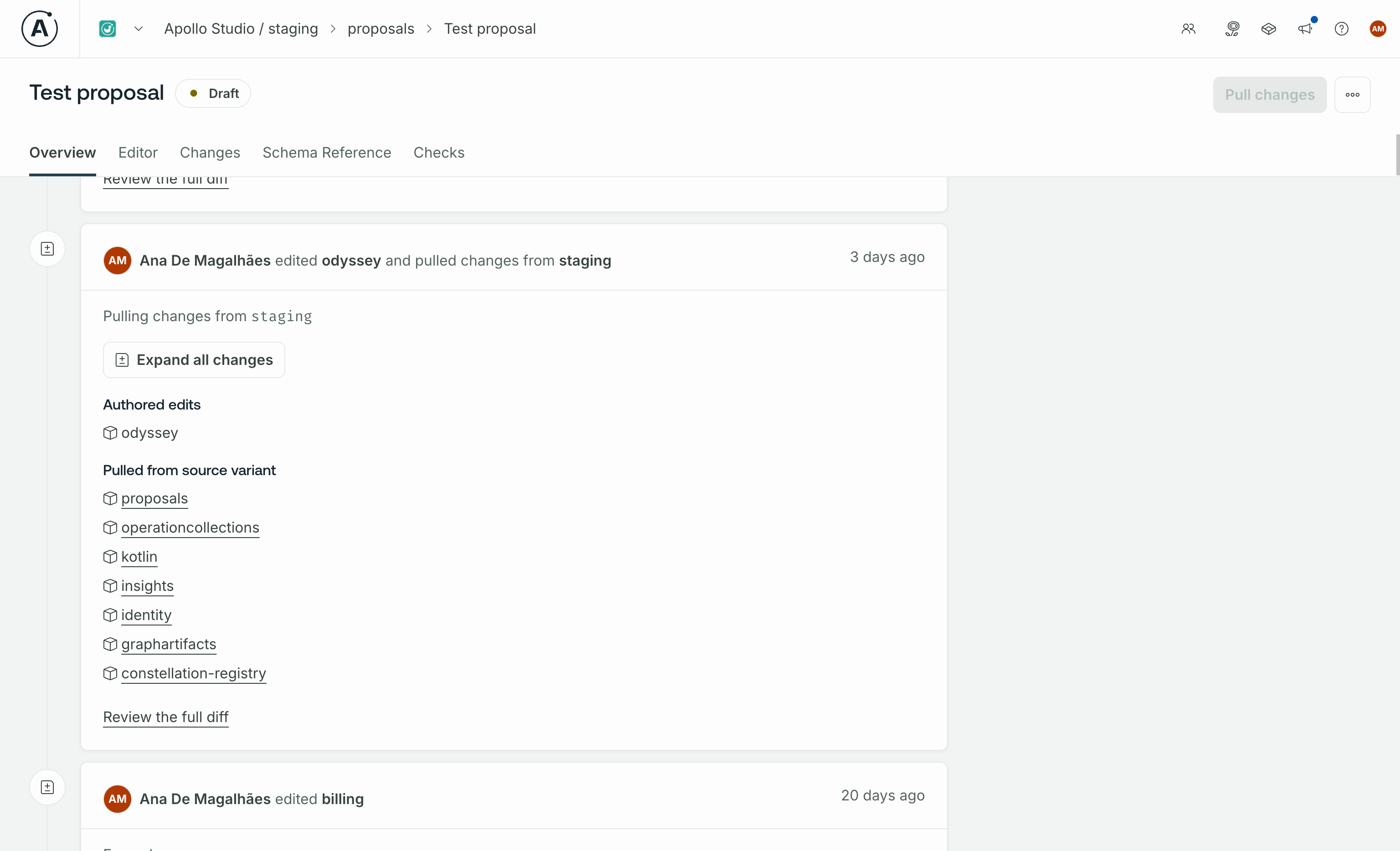
Pulling changes from a source variant and authoring your own are different kinds of work, and the experience now keeps them visibly separate at every step. It starts in the proposal list, where each entry shows whether it’s still in sync with the latest source variant, so you know before opening it whether there’s anything new to pull. When you pull changes into a revision, they show up in a dedicated “Pulled from source” section in the editor, separated from the changes you authored. And when you save that revision, both show up together in a single activity feed card with clearly labeled sections, so the timeline tells the full story of a save without fragmenting it. That same language carries through to the Changes page sidebar, which now reflects where you are: browsing across all revisions (think GitHub’s “All commits” view), or scoped into one with its authored and pulled sections clearly labeled.
Commenting in place
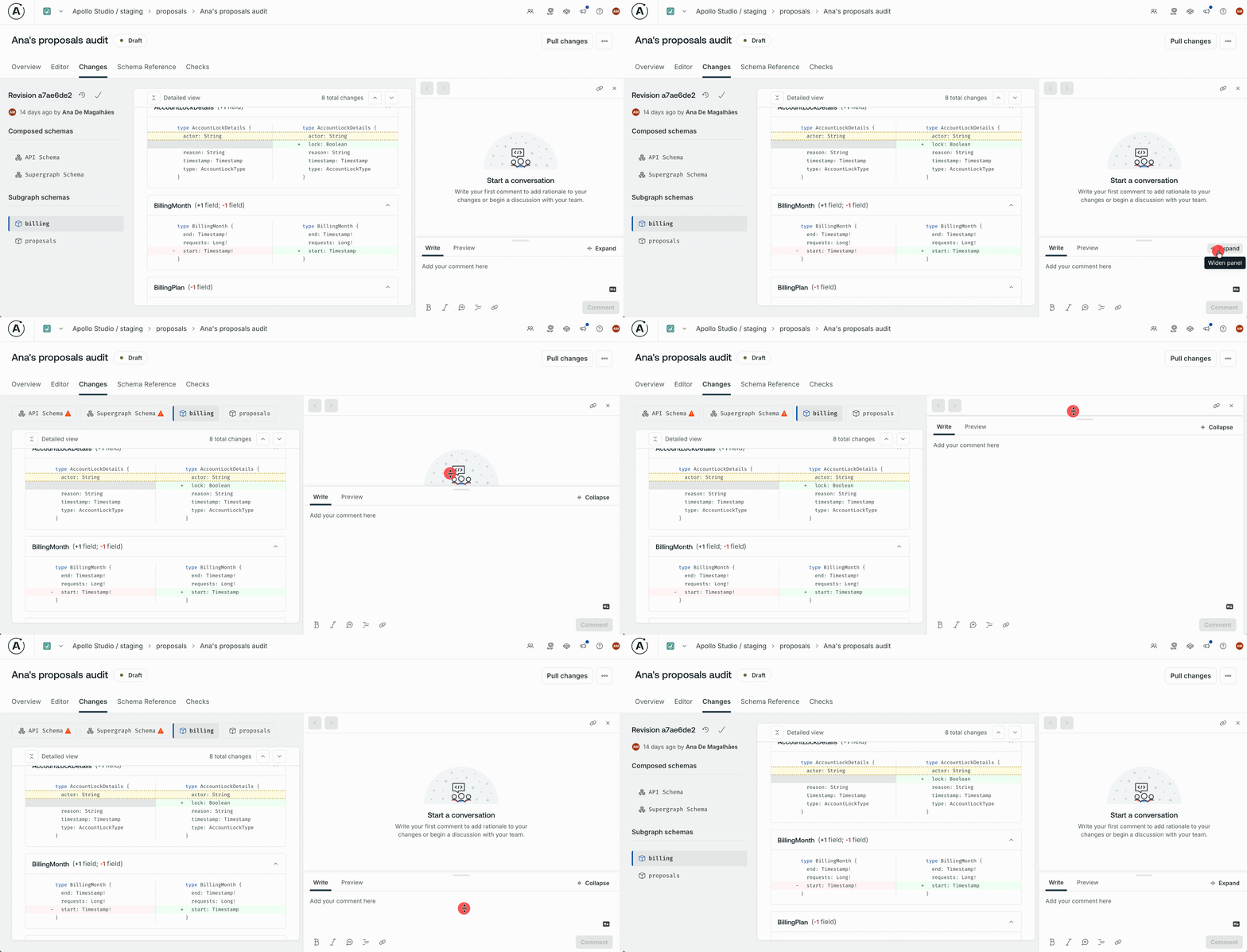
Comments shouldn’t feel cramped, especially for the longer reviews and discussions that often shape a schema change. The comment drawer can now adapt to the scale of what you’re writing: drag it wider for more horizontal room, and drag the text area taller for more vertical room. The Write and Preview tabs were also cleaned up, so longer comments are easier to format and review.
Resolving conflicts in the editor
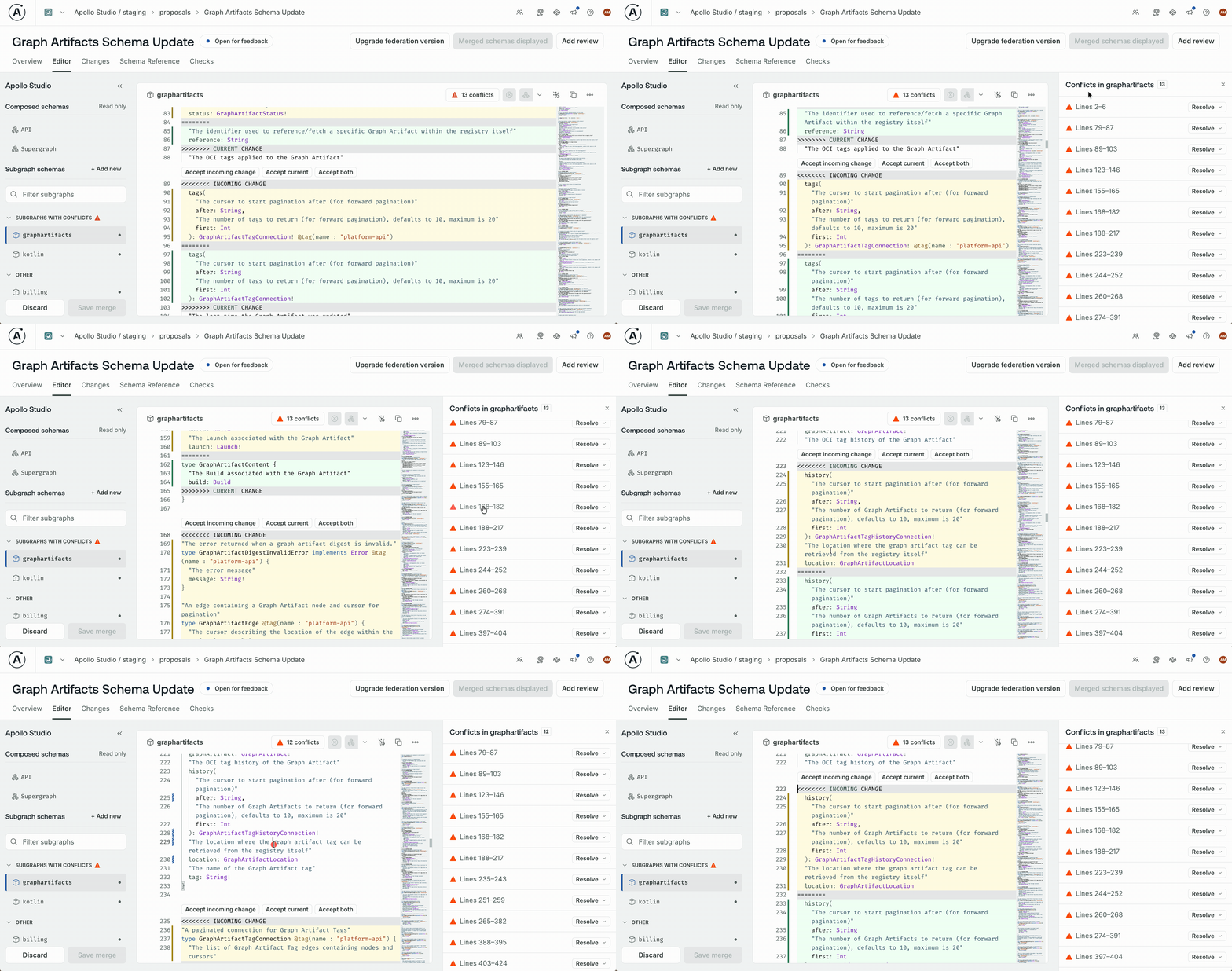
A conflict shouldn’t drop you out of the workflow you were in. The proposal editor can now show you when a conflict exists, help you make sense of it, and let you resolve it without leaving the place you were working.
Resolving a conflict in a proposal used to be a heads-down, manual job: find the conflict markers in the SDL, read both sides, edit the file to keep what you wanted. There was no signal that conflicts existed unless you went looking for them, and no scaffolding for the work of resolving one once you did.
Now, conflicts are visible from the moment they appear. A count badge in the editor toolbar tells you how many there are, and every conflict region is highlighted inline, with colored backgrounds that distinguish your changes from the incoming ones at a glance. Each conflict has its own set of clearly-named actions (“Accept incoming,” “Accept current,” “Accept both”) rendered right above it, so resolving one is a single click rather than a manual edit.
A dedicated conflicts drawer gives you a list view of every conflict in the active subgraph, with navigation between them and the same resolution actions as the inline buttons. Keyboard users have a full parallel path, and the drawer opens from the toolbar or with a keyboard shortcut.
The editor itself also gets quieter while you’re resolving. The diagnostic noise that conflict markers usually trigger is suppressed, so the only thing in your way is the actual work to do.
Flagging inaccurate diffs
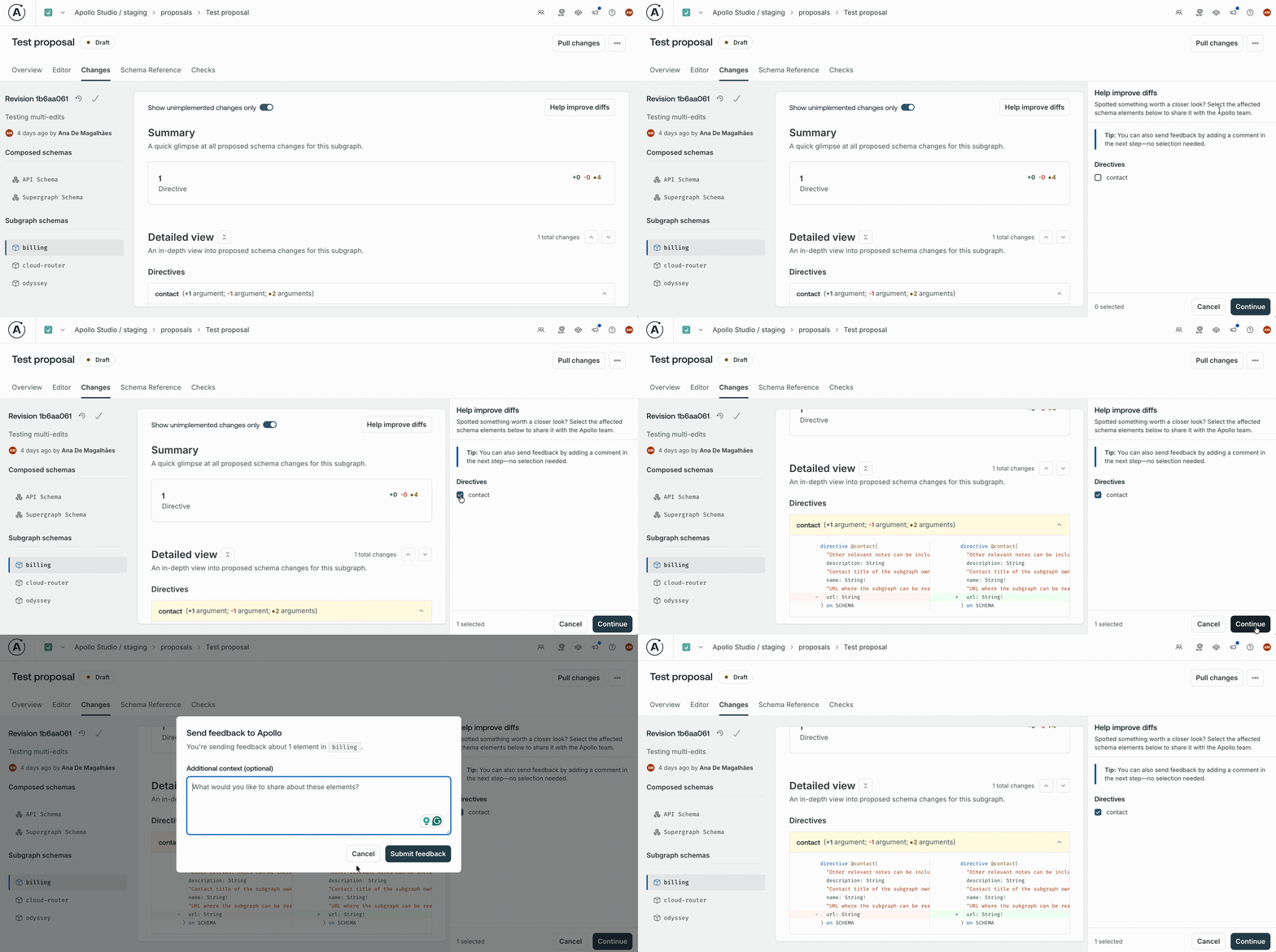
Occasionally, diffs may not perfectly capture your changes, such as when pulling upstream updates or encountering stale conflict badges. Previously, flagging these inaccuracies required filing a support ticket, which often left issues unreported and delayed fixes.
We’ve introduced a new diff reporting option directly on the Changes page. If you spot a missing change, incorrect removal, or unusual conflict indicator, you can flag it in one click.
This creates a structured feedback loop, allowing us to capture the necessary proposal context automatically. By surfacing these edge cases, you help us prioritize fixes and close the accuracy gap, ensuring the diffs you review are always reliable.
Better webhook notifications
When teams wire proposals into their own automation, the events that fire from GraphOS have to carry enough context to be useful. Until now, a proposal webhook event told you that something happened, along with a handful of IDs, but not much about what actually changed, who triggered it, or what the proposal looked like. Getting that context meant a follow-up Platform API call, which added overhead and friction to any integration.
We have closed this gap by enriching the existing webhook payloads and adding new event types. Proposal events now include the proposal title, the actor who triggered the event, a direct Studio URL, the affected subgraphs, and (where relevant) the current approval progress. Your integration gets the context it needs from the event itself.
Two new event types have been added:
- REVIEW_SUBMITTED fires when a reviewer submits a review on a proposal, with the reviewer’s details and the review outcome included. This is distinct from the existing approval event: Proposals can require input from multiple reviewers, and not every review is an approval. Teams tracking review activity now have a dedicated event for it.
- COMMENT_MENTION fires when a user is @mentioned in a proposal comment, with the mentioned user’s info and a link to the specific comment. For teams routing notifications through their own tooling, @mentions can now get the same urgency they’d have inside Studio.
Finally, for teams already using Slack for schema coordination: Proposals now supports Slack channels as a notification target alongside webhooks. You can subscribe a Slack channel to the same proposal lifecycle events, with messages formatted using Block Kit so each notification carries the proposal name, the event that triggered it, who caused it, and a link back to Studio.
Building on a reliable API
Schema proposals are an essential part of modern CI/CD pipelines. To better support your automated workflows, we’ve strengthened the Proposals API, focusing on robustness and integration reliability. We’ve overhauled our core matching logic (ProposalsCheckTask), ensuring that schema coverage and check results are precise and dependable. We’ve also refined conflict detection to eliminate false positives caused by upstream changes, ensuring that your review process remains focused on the updates you actually authored. Finally, we’ve improved our platform’s observability by cleaning up logging noise, making it easier to diagnose issues quickly. These enhancements provide the consistent, reliable data you need to power your schema governance at scale.
Strengthening our foundations
A governance workflow is only as strong as the trust you place in it. When reliability is compromised by inconsistent status flags, phantom conflicts, or unexplained check failures, the entire review process suffers. We’ve dedicated significant effort to identifying and closing those trust gaps. We’ve overhauled the core matching logic to ensure that statuses and schema checks accurately reflect your supergraph, eliminating errors like incorrect “Implemented” transitions. We’ve also resolved UI inconsistencies, including false-positive conflict badges and race conditions that hindered diff loading. By removing ambiguity from the system, we’re ensuring that proposals are predictable and stable, giving you the confidence to manage even your most complex schema changes.
What this adds up to
Schema proposals were already a meaningful part of how graph teams ship schema changes. The work shipping in this release is about making them feel like a natural part of how those teams already work: the proposal workflow flows the way the work actually flows, the API meets your schema changes where they live, and the foundations underneath both are reliable enough to build on with confidence.
If you’re already using proposals, this release should feel like it caught up with the way your team has been using them all along. If you’ve been thinking about bringing schema proposals more deeply into your pipelines or your agent-driven workflows, this release makes that practical. If you’d like to dig into it further, our schema proposals docs have you covered.
And we’re not finished. There’s more to do on diff intelligence, on conflict resolution, and on the developer experience of the Platform API. Even so, this release is a meaningful step toward schema proposals becoming more than just a place to coordinate schema changes, and into a piece of platform infrastructure your team can rely on.
Note: Alex Lange and Chris Lee also contributed to this blog post.


